

Inspiring
August 24, 2026
Answered

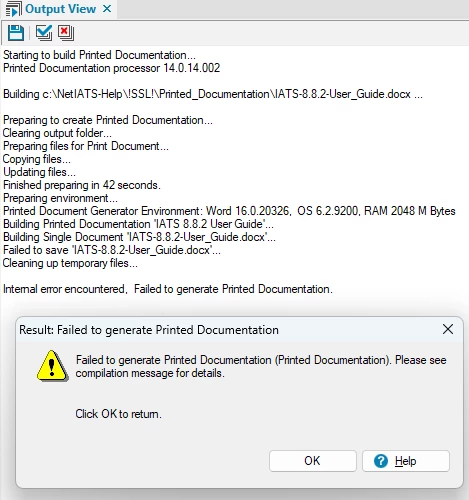
I am unable to generate printed documentation. It always fails when attempting to save the Word document
  • August 24, 2026
  • 17 replies
  • 57 views

This keeps happening when I attempt to generate printed documentation.

Does anyone know what would cause this?

    Correct answer davidf27383140

    It turns out that my problem was created by a Microsoft update.


    17 replies

    Peter Grainge
    Community Expert
    Community Expert
    August 25, 2026

    Can you install RoboHelp on a machine outside your network? It will be in trial mode but that doesn’t matter.


    My site www.grainge.org includes many free Authoring and RoboHelp resources that may be of help.

    Use the menu (bottom right) to mark the Best Answer or Highlight particularly useful replies. Found the answer elsewhere? Share it here.
    Jeff_Coatsworth
    Community Expert
    Community Expert
    August 25, 2026

    Before you do that, what about the fresh dummy project? Did that fail also?

    Inspiring
    August 25, 2026

    Yes, it failed as well.

    Jeff_Coatsworth
    Community Expert
    Community Expert
    August 25, 2026

    Hmm, that sounds like something in your environment has changed then - if it worked in May & fails now, and your RH version hasn’t changed (which I imagine it hasn’t since it’s still RH2019 Classic), then it’s got to be something in either the version of Word or your rights to save files in that folder. I notice that it seems to fail when trying to save the resulting docx file - did your anti-virus software change since May? Maybe some over-zealous AV program is trying to “protect” you. See if running RH as an admin makes any difference.  

    Peter Grainge
    Community Expert
    Community Expert
    August 25, 2026

    @Jeff_Coatsworth is spot on questioning the version of Word. Classic versions were sensitive to the version they were paired with. That was one of the big wins with the new UI, it is Word version agnostic, indeed you don’t even have to have Word installed to get a Word output.

    Gemini gives a list but I thought the pairing was more specific.

    You haven’t said which versions of RoboHelp and Word you have.

    Another thing that sometimes helped was switching from DOCX to DOC. Doubtful but worth a try.


    My site www.grainge.org includes many free Authoring and RoboHelp resources that may be of help.

    Use the menu (bottom right) to mark the Best Answer or Highlight particularly useful replies. Found the answer elsewhere? Share it here.
    Inspiring
    August 25, 2026

    Hello Peter,

    Thanks for your continued interest in my problem.  I am running Microsoft Office 365 and using RoboHelp 2019 in the Classic mode.  Also, I have switched back and forth between doc and docx.  That made no difference.  The last time I generated Printed Documentation was in May of this year and I had no problems.  I’m thinking about re-installing RoboHelp.

    Peter Grainge
    Community Expert
    Community Expert
    August 25, 2026

    There have been some posts about installing Classic versions, I would leave that to last.

    Have you tried the clean project ​@Jeff_Coatsworth suggested? Also try one of the sample projects as they are known to work.

    Is your project local? It looks like you are generating to a local drive.


    My site www.grainge.org includes many free Authoring and RoboHelp resources that may be of help.

    Use the menu (bottom right) to mark the Best Answer or Highlight particularly useful replies. Found the answer elsewhere? Share it here.
    Jeff_Coatsworth
    Community Expert
    Community Expert
    August 24, 2026

    Was this working before? If so, what’s changed?

    Inspiring
    August 24, 2026

    Jeff,

    That’s a great question that I do not have an answer for.  I was able to generate Printed Documentation that last time I tried in May, 2026.  

    I have several projects and I get the same error at the same point with all of them.

    Jeff_Coatsworth
    Community Expert
    Community Expert
    August 24, 2026

    Did your version of Word change? To rule out an issue with your project, try creating a fresh dummy project (not based on any of your existing projects or SSL recipes) and see if you still get the program stopping at the same place. If it fails too, then you know it’s something in your environment that is causing the failure.

    Inspiring
    August 24, 2026

    Thanks Peter, but I believe my problem is something else.  I have about 6 different RoboHelp projects, and I get the same error at the same point when I try to generate Printed Documentation in any of the projects.  If you have any other ideas, I welcome them.   I could not try using the sample projects as you suggested because I deleted them.

    Dave  

    Peter Grainge
    Community Expert
    Community Expert
    August 24, 2026

    From the path and the dialog, you are still using a Classic version of RoboHelp.

    First of all print one of the sample projects to confirm the issue is just with what you are trying to generate.

    Try the first and third links in this old topic. https://www.grainge.org/RoboHelp/Print/Printed_Output.htm

    The standard solution when all else failed was known as Divide and Conquer. It seems to be time for the old divide and conquer approach.

    Zip up the project so you have a copy that cannot accidentally be opened and worked on. That gives you a copy that you can safely revert to later if needed. Save the zip file somewhere safe.

    CLASSIC VERSIONS

    Create another copy of the project so that you have two copies that can be worked on.

    Open Copy 1 and delete half the topics. Ignore any broken links reported. Generate the help from that copy.

    Open Copy 2 and delete the other half of the topics. Generate the help from that copy.

    It should be the case that one copy is now OK and one still has the problem.

    Trash the good copy and then create a second copy of the copy with the problem.


    Repeat the process until you have located the topic that is causing the problem.

    The process takes less time than you might think.


    My site www.grainge.org includes many free Authoring and RoboHelp resources that may be of help.

    Use the menu (bottom right) to mark the Best Answer or Highlight particularly useful replies. Found the answer elsewhere? Share it here.
