

titimomotete
Inspiring
March 9, 2026
Answered

I do not succeed to create contextual help with map ID

  • March 9, 2026
  • 3 replies
  • 52 views

Hi


We have a web application (online database) and need to create a webhelp and contextual help for each field of this database.

We previously use another autorhing tool (HelpStudio) but we had to change to Robohelp. Unfortunately, in France there is no courses available and i have to train Robohelp by myself.

I did not found any help on the web to help me to do this : I already created somes topics in Robohelp and begin a map file to create maps ID. Unfortunatly, whatever ID i try to reach with this url index.htm?rhmapno=ID, i allways land to the same page


i created

  • an introduction topic,
  • two others topics
  • a map file with two ID, 1 and 2, for the two topics i want to reach directly

I build the frameless output and try to reach the second topic with the id but nothing work : i am always redirect to the same topic.

What did i miss or forgot to do ?

Below the map file :
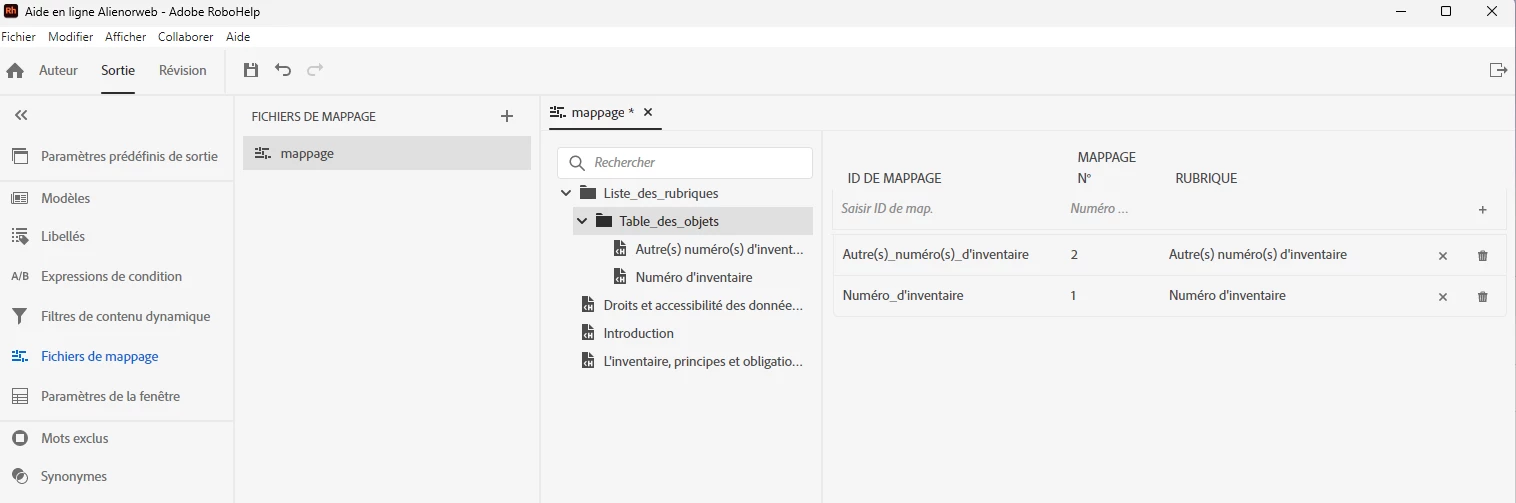
Here the output : https://bases.alienor.org/aide/rh/index.htm

but if i try to reach map 2 by example with this url https://bases.alienor.org/aide/rh/index.htm?rhmapno=2, i land to “introduction” and not to autre(s)_numéro(s)_d’inventaire


Thanks for your help.

    Correct answer Jeff_Coatsworth

    Can you show us a screenshot of the mapid file? And confirm that you are including it in your output?

    3 replies

    Peter Grainge
    Community Expert
    Community Expert
    March 9, 2026

    For the benefit of anyone looking at this thread in the future, here’s how to include the map file in your output.

    The name you give the file when you create the map file will appear in the dropdown.


    My site www.grainge.org includes many free Authoring and RoboHelp resources that may be of help.

    Use the menu (bottom right) to mark the Best Answer or Highlight particularly useful replies. Found the answer elsewhere? Share it here.
    Jeff_Coatsworth
    Community Expert
    Jeff_CoatsworthCommunity ExpertCorrect answer
    Community Expert
    March 9, 2026

    Can you show us a screenshot of the mapid file? And confirm that you are including it in your output?

    titimomotete
    Inspiring
    March 9, 2026

    That was the correct answer : “confirm that you are including it in your output?”


    No. It is now done, and this solved my problem.

    Now i can reach the correct topic with the ID.


    Thanks. I return to my RH tutorials 😆

    Peter Grainge
    Community Expert
    Community Expert
    March 9, 2026

    Doh! I should have remembered that. Apologies.

    ________________________________________________________

    My site www.grainge.org includes many free Authoring and RoboHelp resources that may be of help.  

    Use the menu (bottom right) to mark the Best Answer or Highlight particularly useful replies. Found the answer elsewhere? Share it here.
    Peter Grainge
    Community Expert
    Community Expert
    March 9, 2026

    You haven't said which version of RoboHelp you are using. Please always start a thread with this information. Go to Help > About to get the full version number.

    Hopefully I can help you beyond just the question.

    See if this topic on my site helps you.

    https://www.grainge.org/RoboHelp_Tour/rh2022/outputs/calling_csh_help.htm

    As to training, if you want I can point you to some US based online training.


    My site www.grainge.org includes many free Authoring and RoboHelp resources that may be of help.


    Use the menu (bottom right) to mark the Best Answer or Highlight particularly useful replies. Found the answer elsewhere? Share it here.
    titimomotete
    Inspiring
    March 9, 2026

    Hi,


    My version is 2022.6.34

    I already seen you website, it is where i found the way, in theory, to reach a specific topic, but i do not work in my case, probably because i missed to do something before. But tutorials i found do not seem to cover this subject.

    Peter Grainge
    Community Expert
    Community Expert
    March 9, 2026

    Take a look at Item 10 on https://www.grainge.org/RoboHelp_Gems/RoboHelp_Gems.htm#generating

    If that doesn’t help, try Adobe Support. See https://helpx.adobe.com/contact/enterprise-support.other.html#robohelp for your Adobe Support options. The email link tcssup@adobe.com is recommended as it reaches a team dedicated to Technical Communication Suite products including RoboHelp.

    Sorry but this is not a feature I have practical experience with. The call you are making looks correct and is in line with what Adobe advised me.

    Please post back with whatever Support advise.


    My site www.grainge.org includes many free Authoring and RoboHelp resources that may be of help.

    Use the menu (bottom right) to mark the Best Answer or Highlight particularly useful replies. Found the answer elsewhere? Share it here.