
I get this message everytime I modify a topic page...
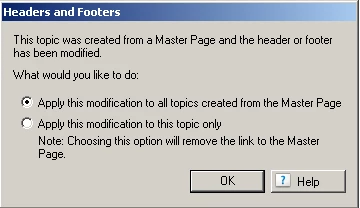
I am using RH8 but got the message in RH7 on all my projects, new and converted from RH6.
In RH7 I just clicked OK, and the only problem this caused is that all the pages would be "new" after generating so the publishing took a long time.
With RH8 a new problem has arisen. When I click OK, the path to the files on the Master Page header change to the path of the topic page I am modifying. This causes the image and script liinks to be broken on every page using the Master Page.
For example:
The Master Page is in the project root and in the header I have an image of images/Example.png.
When I edit the body of the topic page processing/about_processing.htm, which uses the Master Page in question, I get the message above and click OK.
If I look at the Master Page the image path is now processing/images/example.png, which doesn't exist.
Is there some setting that I need to adjust or some tweek I can make so that every change to a topic doesn't make RH think the Master Page was updated?
Thanks in advance John


 AdChoices