
fiservdaniel
Known Participant
April 27, 2015
質問

I need to place icons (Next, Back, Print, Show) on the right side of the page.

  • April 27, 2015
  • 返信数 1.
  • 361 ビュー

The current solution is to use the following in the CSS.

div.options {

  position:relative;

        width:100%;

        left: 860px;

        padding:2%;

        background:transparent !important;

However, this solution locks the icons to the right and they do not move when the window is sized:
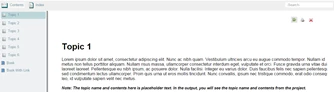
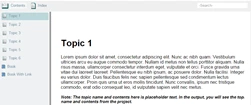
Is there a responsive method I can use to accomplish my goal?

I am using RoboHelp 10.

Thanks - Dan

このトピックへの返信は締め切られました。

返信数 1

Willam van Weelden
Inspiring
April 28, 2015

Are you using WebHelp? Try:

div.options {

     float: right;

}

fiservdaniel
fiservdaniel作成者
Known Participant
April 28, 2015

Hello William,

Silly me. I’m using HTML5 – Desktop layout.

I know just enough HTML to get myself in trouble. I started with your “PnP-WH-Generic” layout and got it to this point:

Your first suggestion moves the icons to the right side of the screen. I need them to be as shown above.

Here’s the relevant (I believe) HTML:

And here’s what I believe is the applicable CSS info:

div.content

div.toolbarbuttons

div.toolbarbuttons > div

div.logo

div.searchsimple

div.options

div.printbutton

div.header div.showhidebutton {

height: 23px;

line-height: 23px;

float: left;

margin-top: 5px;

margin-left: .8em;

font-size: .8em;

padding: 0;

width: auto;

Thanks for your help!

Dan

Captiv8r
Legend
April 28, 2015

Correct me if I'm wrong here, but why wouldn't this be as simple as inserting the images you need and configuring them so they appear on the right side of the screen?

Cheers... Rick