

Participant
June 27, 2022
Question

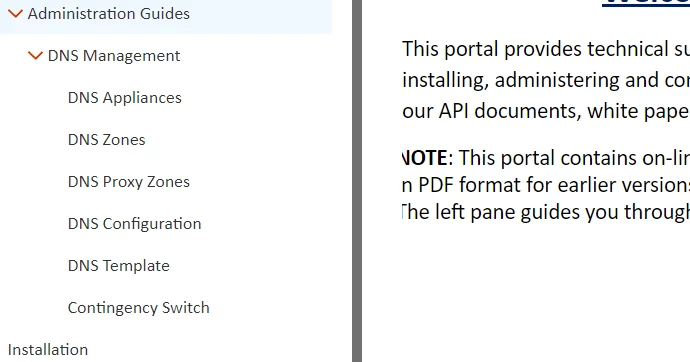
I used orange skin in RH 2020 version, in output left side text is missing?
  • June 27, 2022
  • 2 replies
  • 171 views

Is there any solution, to get my left side text back?

 

    This topic has been closed for replies.

    2 replies

    Community Expert
    June 28, 2022

    Have you made any customisations to the skin? If yes, add the Orange skin again with a slightly different name (e.g. OrangeTest) and generate using that skin without modifying it. If the problem doesn't occur, then some change you made to your skin is causing the issue and you'll need to either:

    1. start customising the skin again, or

    2. undo the customisations you've made one-by-one until you find the issue - likely a margin or padding has been set someone.


    If it's not the skin, and the issue is only with the note paragraph, that indicates an issue either with the style applied to that paragraph, or to the html code of that paragraph. For the former, check the style in your stylesheet - the most likely areas to check are the left margin and padding. For the latter, in your topic, select the text "Note" then switch to code view and look at the code immediately before the selected text - you may find inline styles setting a margin or padding.


    You can post back with what you find if you need more help. Please add any images using the Insert Photos icon so the image is inline with the text. This is easier to follow and gets around issues with attachments on the forums. 


    Jeff_Coatsworth
    Community Expert
    Community Expert
    June 27, 2022

    Are you talking about the left margin of the right-side column of text or something in the TOC in the left column? 

    Participant
    June 28, 2022

    The Left margin of the right side.