
Participant
January 5, 2016
Question

I want to open context-sensitive floating help windows using RoboHelp HTML5. Is this possible?

  • January 5, 2016
  • 1 reply
  • 834 views

My customer has developed a web application that consists of a series of pages of forms. The web application can be accessed via laptops or smart devices (browser-based).

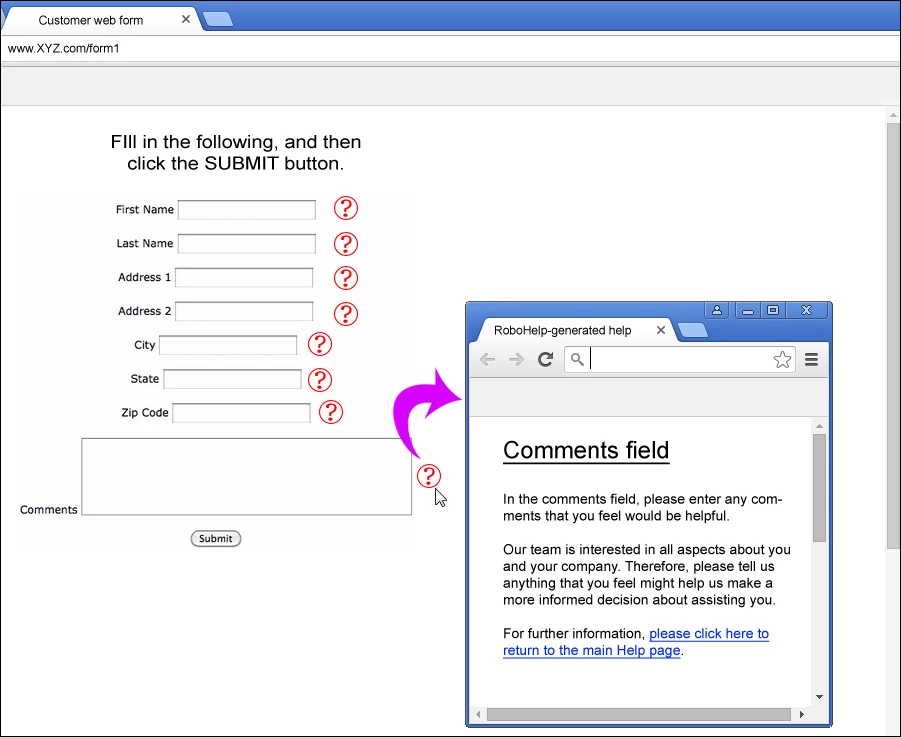
Next to each form field, they want to embed context-sensitive help buttons (shown in the example below as question marks). The customer has specifically requested that, when the user clicks a help button, they don't want the user brought to a new tab in order to read the help topic. They either want the help topic to appear as a floating window on top of the existing tab, or somehow embed the help topic within the existing tab. Are either of these possible?

To visually show you what I'm looking for, I made an example shown below. When the user clicked the help button next to the Comments field, a floating RoboHelp help window appears in front of the form. The user would then read the info in the window, and then close it (thus returning to the form).

Again, is this possible in RoboHelp? If so, how? The biggest issue (in my opinion), is that smart device browsers (such as Safari) don't seem to have floating windows or tabs.

Any opinions on this would be most appreciated!
This topic has been closed for replies.

1 reply

Willam van Weelden
Inspiring
January 6, 2016

There are two ways in which you can accomplish this, both by using Context Sensitive Help:

  1. Use the default CSH API from RoboHelp. You'll find the required files in your RoboHelp installation directory, subfolder called CSH API. This API contains a description of how to use it so that you can call the help. You can also let the help open in a popup.
  2. Create your own CSH call. Open a popup from your site and load the correct URL in the popup. (For URLs, see: http://www.wvanweelden.eu/article-category/context-sensitivity)

The question is what type of output you are planning on creating. For WebHelp, you will need to create a Window definitionin RoboHelp and use that in your help call as well.

Captiv8r
Legend
January 6, 2016

LOL, Willam, I was hoping you might pop in on this one.

What seems to remain unanswered here is whether a smart phone or a tablet will actually support a pop up window as they are talking about. Because I'm not in that space, I have no clue and it would be nice to know.

Thanks... Rick

Willam van Weelden
Inspiring
January 6, 2016

Mobile devices will open a new tab. Not much to do about that. But it will work for desktop as the screen shot suggests.

For targeting mobile and tablets, it would be better to load the content in an iframe and load that within the page itself. (If you want it embedded.)