
Icons for Note/Tip formats, and numbers in breadcrumbs
A couple more "newbie" questions here ...
First question. I have several notes, tips, and warnings in the manual I am working on. When the manual was done in InDesign I placed an icon at the left side of the text to easily identify whether it was a note, tip, or warning. Is there a way to accomplish this in RoboHelp?

Second question. I've added breadcrumbs at the top of the page, and using a | separator between levels. But the default breadcrumb style shows a number beside the Home link, which filters down through the various breadcrumb levels after publishing. I can't figure out where this number is coming from and how to remove it ... see below for example, which shows both the separator and the number on the page:
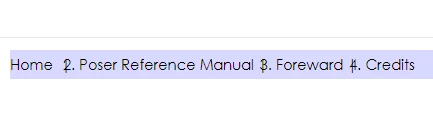
Thanks in advance!
Denise


 AdChoices