
Inspiring
December 29, 2017
Answered

Icons Show in Preview + Browser - not for
  • December 29, 2017
  • 1 reply
  • 560 views

When I preview my settings, I see the TOC / Index / Search / Glossary icons in the preview & when I open in a browser (Chrome, Firefox, IE).

When I compile and view my HTML5 output, there are no icons.

Has anyone encountered this?

I've tried

opening an older project (A) and compiling with the same layout - the icons display for project A in the browser

copying the !ScreenLayout!\Charcoal_Grey folder from the A project folder to the 'troubled' project folder (Troubled) - the icons don't display after I compile the Troubled project and view in the browser.

opening both projects in separate RoboHelp instances and comparing my settings -  I don't see a difference.

creating a brand-new project (Newbie) and compiling, the icons display for project Newbie in the browser.

What else could I try?

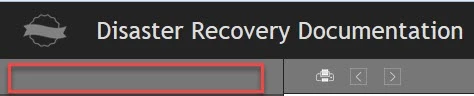
Message was edited by: Paul Hanson - added screenshot of what I see in the browser, after compiling - the red box is where the TOC / Index / Search / Glossary icons should be.

This topic has been closed for replies.
Correct answer Captiv8r

Try creating a fresh layout?

In the blank area of the problem layout, when you mouse over is there an indication it is clickable or hover text that shows?

Cheers... Rick

1 reply

Captiv8r
Captiv8rCorrect answer
Legend
December 29, 2017

Try creating a fresh layout?

In the blank area of the problem layout, when you mouse over is there an indication it is clickable or hover text that shows?

Cheers... Rick

prhmusic2Author
Inspiring
January 2, 2018

There's no clickable or hover text that shows when I mouse over the problem area.

I think I tried to create a fresh layout last year <wink>, but I'll try it when my AM backup completes.

Update: I had tried creating a new Output (SSL), but not a new screen layout. I created a new SSL called "FreshNewDR", went to its properties, clicked Customize Selected Layout and selected Charcoal_Grey. I clicked Ok and got a message saying Charcoal_Grey already existed and to change the name so I named it "Charcoal_Grey2", clicked Ok, selected Charcoal_Grey in the drop-down in the "Manage Layout" section of the Responsive HTML5 Settings window, clicked Save and Generate, and I now have my icons showing!

Another Update: I compared the Charcoal_Grey folder to the (new) Charcoal_Grey2 folder and found out that all the files are duplicates except for "MasterThemeSchema.xml". I used the Diff Checker website to compare the two files.

Final update: I tried to upload a graphic of what Diff Checker found but the JPG was too big for the forum. I copied the "MasterThemeSchema.xml" file from the Charcoal_Grey2 folder to the Charcoal_Grey folder, thinking it would fix the Charcoal_Grey layout, but it didn't. I am just going to use the "Charcoal_Grey2" layout since I know it works!