


Question
iframe name does not show up in display in frame list
I am trying to make in page tab browsing using iframe in Modern RoboHelp.
When I add an iframe using Insert HTML Elements, It does not provide a place to insert a name. It has a place to assign an ID. I have to assign a name to the iframe manually in HTML. (Assigning an ID does not seem to help.)
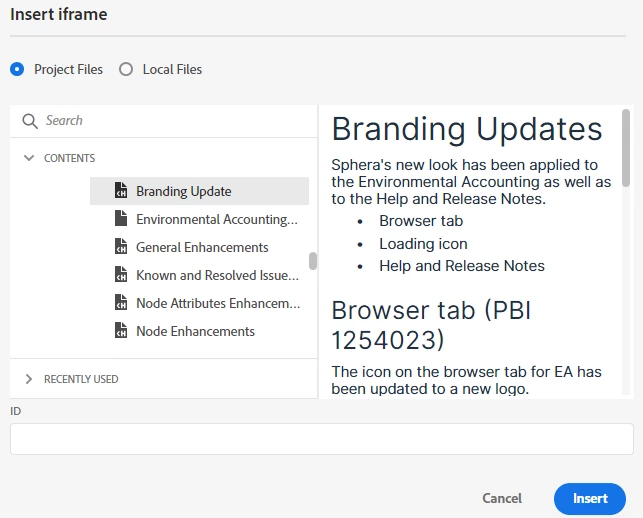
I have manualy added the name "TabFrame" to my iframe.
When I add a hyperlink to the page, the name of the iframe is not present in the list of names of Frames.
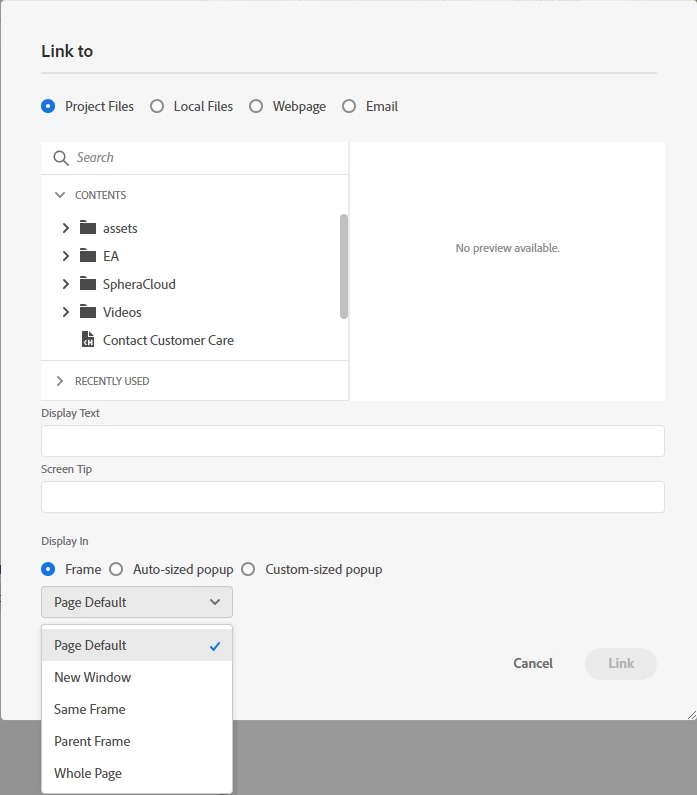
This is the code that works:
 <h1>Test tabs</h1>
  <p><a href="../Release_Notes/2024/August_14_2024/Branding_Update.htm" target="TabFrame">Link 1</a></p>
  <p><a href="../Release_Notes/2024/August_14_2024/General_Enhancements.htm" target="TabFrame">Link 2</a></p>
  <p><a href="../Release_Notes/2024/August_14_2024/Node_Enhancements.htm" target="TabFrame">Link 3</a></p>
  <p>iFrame:</p>
  <p><iframe src="../Release_Notes/2024/August_14_2024/Branding_Update.htm" width="560" height="315" name="TabFrame"></iframe></p>
I would like it though to be easier to just attach the hyperlink to the iframe without having to use HTML because not everyone in my team is versed in HTML. Is there something I am missing in RoboHelp to make this work correctly?
WIndows 10
RoboHelp Version 2022.3.93
 AdChoices