
Inspiring
December 8, 2020
Answered

image frames in RH

  • December 8, 2020
  • 2 replies
  • 266 views

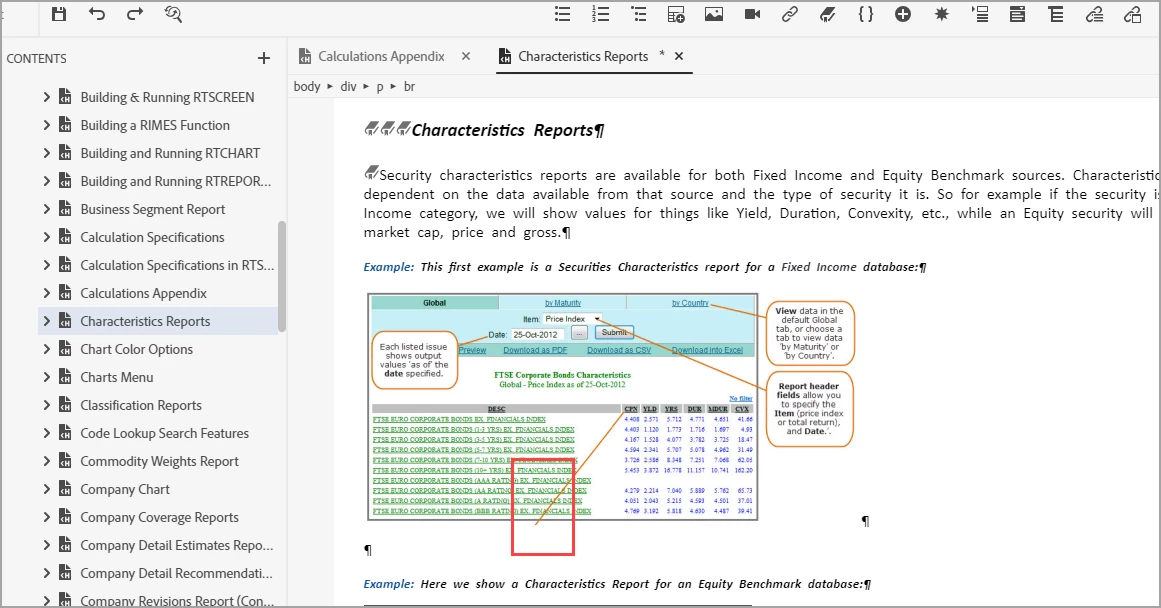
I am viewing my RH content via Project-Content, and applying condional tags. This content was imported via Framemaker import. I now see that one of my screen captures goes beyon the bottom of the frame. An easy fix in FM, I select the frame, drag it down until my full image is inside the frame, done. But in RH the frame is not displayed, nor can I select a frame around an image. How do I make the FM image frames show up so that I can manipulate them if needed? In the image below i put a red square around an arrow in the image that goes nowhere because the bottom of the image is below the image frame. Is there a way to edit this in RH so that I can lower the frame or are the image frames lost in RH?


    This topic has been closed for replies.
    Correct answer Jeff_Coatsworth

    Since you imported, your only fix is to repair the image in FM & import into a new RH project. If you had linked your content, you could have fixed it in FM and resynch'd it in RH.

    2 replies

    Jeff_Coatsworth
    Community Expert
    Jeff_CoatsworthCommunity ExpertCorrect answer
    Community Expert
    December 8, 2020

    Since you imported, your only fix is to repair the image in FM & import into a new RH project. If you had linked your content, you could have fixed it in FM and resynch'd it in RH.

    Community Expert
    December 8, 2020

    I think the if the Framemaker image is made up of a bunch of objects, it'll be converted to a single, flat png or gif or jpg file, as Robohelp doesn't really work with layers at all. So I think that it's being left out when the image is converted, for some reason, and I'd double-check in Framemaker that the missing object is included in exactly the same way as the objects that make it through the conversion process.