
Participating Frequently
Mar 9, 2022 12:49 PM UTC
Answered

Image Map Issue in RoboHelp 2020.7.46

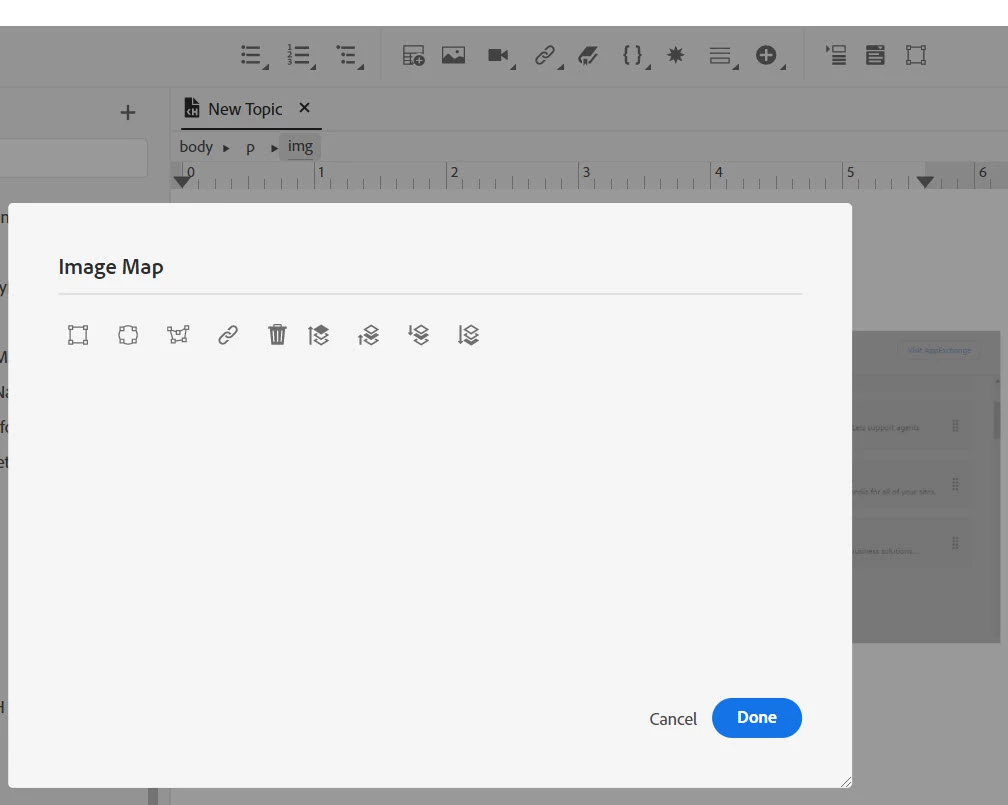
Whenever I am trying to create an image map on an image in a topic, the image is not displayed in the image map popup. Since the image is not visible I'm unable to create an image map.

I want to create image maps so that various parts of the image can be linked to relevant topics.


Please Help:


Attached an image for reference:
    This topic is closed to new replies. Start a new post to keep the conversation going.
    AmebrCorrect answer
    Community Expert
    Mar 10, 2022 11:00 PM UTC

    I think it will be the over all path length to the file, which is a windows limitation and must be less than 260 characters.


    I have used folder and file names longer than that, but I also ensure my projects are in a very short folder path on my C drive. e.g. c:\Projects\Project1, c:\Projects\Project2, etc. I avoid network locations and the "Documents" folder as they add many, many characters to the actual path.


    5 replies

    AmebrCommunity ExpertCorrect answer
    Community Expert
    Mar 10, 2022 11:00 PM UTC

    I think it will be the over all path length to the file, which is a windows limitation and must be less than 260 characters.


    I have used folder and file names longer than that, but I also ensure my projects are in a very short folder path on my C drive. e.g. c:\Projects\Project1, c:\Projects\Project2, etc. I avoid network locations and the "Documents" folder as they add many, many characters to the actual path.


    Translate
    Community Expert
    Mar 10, 2022 12:43 PM UTC

    Sorry, I'm out of ideas as it works for me on that version.

    Translate
    Participating Frequently
    Mar 10, 2022 1:54 PM UTC

    @Amebr finally found a solution! 🙂


    The names of the folders or files must not be very long.


    For example, I had named the project folder as MP_Installation_Guide. I renamed to MP_InstallGuide, and it worked.


    I think the Adobe Support team should put a note on the maximum number of characters allowed in folder names.

    Don't know how to tag them!


    Translate
    Community Expert
    Mar 9, 2022 11:04 PM UTC

    It's not a problem I remember being reported before, so here's a bunch of random things to try.


    What is the image format you're using? Can you try a different format to see if that works? What about image size? I could imagine a very large image might not display. Is the project on your local hard drive or a network drive? If it's on a network, can you try a test project on your local drive with a short directory path (like c:\testproject\), in case there's a network issue?

    Translate
    Participating Frequently
    Mar 10, 2022 12:28 PM UTC

    Thank you @Amebr  for a quick response.


    Please find the answers of the questions you had asked:


    What is the image format you're using? Can you try a different format to see if that works?: Tested with different types of image formats. Same screen displayed as shown in the above figure.


    What about image size? I could imagine a very large image might not display.: Tested with different image sizes. Same screen displayed as shown in the above figure.


    Is the project on your local hard drive or a network drive? If it's on a network, can you try a test project on your local drive with a short directory path (like c:\testproject\), in case there's a network issue? : Tested with shorter directory path. Same screen displayed as shown in the above figure.


    Translate