
Image Map Links Not Working
I have created an Image Map which includes hyperlinks to display in frame and also in auto-sizing popups. These links work correctly if the topic is opened from the table of contents but if the topic is opened from a link within another topic the image map links don't work: when the display in frame link is clicked no message is displayed and the topic closes; when the popup link is clicked the following Script Error is displayed:
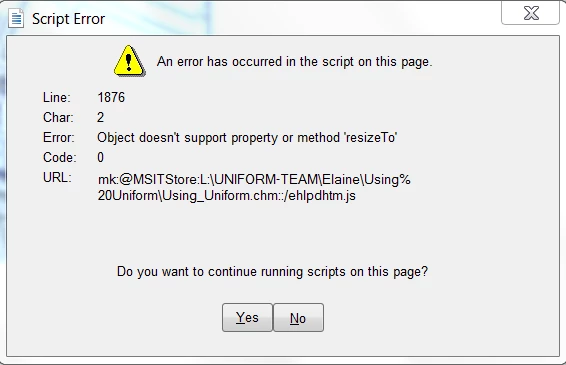
The helpfile was created in an earlier version of Robohelp, version 7 I think, and I have now upgraded to Robohelp 11. In the previous version the popup links in the image map also did not work but the display in frame links did.
I’ve tried creating a new helpfile using Robohelp 11 and both links work correctly.
I read a previous post about ‘popups not auto-sizing’ and wondered if the following fix would resolve my issue but it didn’t have any effect:
After investigation we found out that the issue was with our script files.
You can make the changes in those two problematic files yourself. You have to make same change in both files.
Files will be located at :
..\RH10installDirectory\RoboHTML\eHlpDhtm.js e.g. C:\Program Files (x86)\Adobe\Adobe RoboHelp 10\RoboHTML\eHlpDhtm.js
..\RH10ProjectDirectory\eHlpDhtm.js e.g. C:\Users\UserName\Documents\My RoboHelp Projects\Adobe RoboHelp 10\Samples\EmployeeCare\EmployeeCareProject\eHlpDhtm.js
Go to line no 61(or 62) which would look like ->
var gbInsideCHM = document.location.href.search("::")>0 && document.location.href.search(“chm”)>0;
Now change it to ->
var gbInsideCHM = document.location.href.search("::")>0 && document.location.href.search(/chm/i)>0;
Has anyone had the same issue or know how to fix this?


 AdChoices