

Image maps not "sticky"/resizing incorrectly? - RH2019, Version 11
I have many images in my project for which I must create an image map.
Some of these images have callouts that were created with the images and the callouts are just Arabic numerals and the map areas are these callouts.
Other images have map areas directly on the images - no callouts.
Each image map area links to a topic. Whatever the situation, when I preview any image with a map defined, and click the indicated area, the map is dead nuts on . . . but if I view the image in actual output in a browser, Chrome, Mozilla, etc. then large swaths of the map are shot to heck in a handbasket . . . so many of the clickable areas of the image are so far removed from the actual locations from which I defined them that it renders the image map useless.
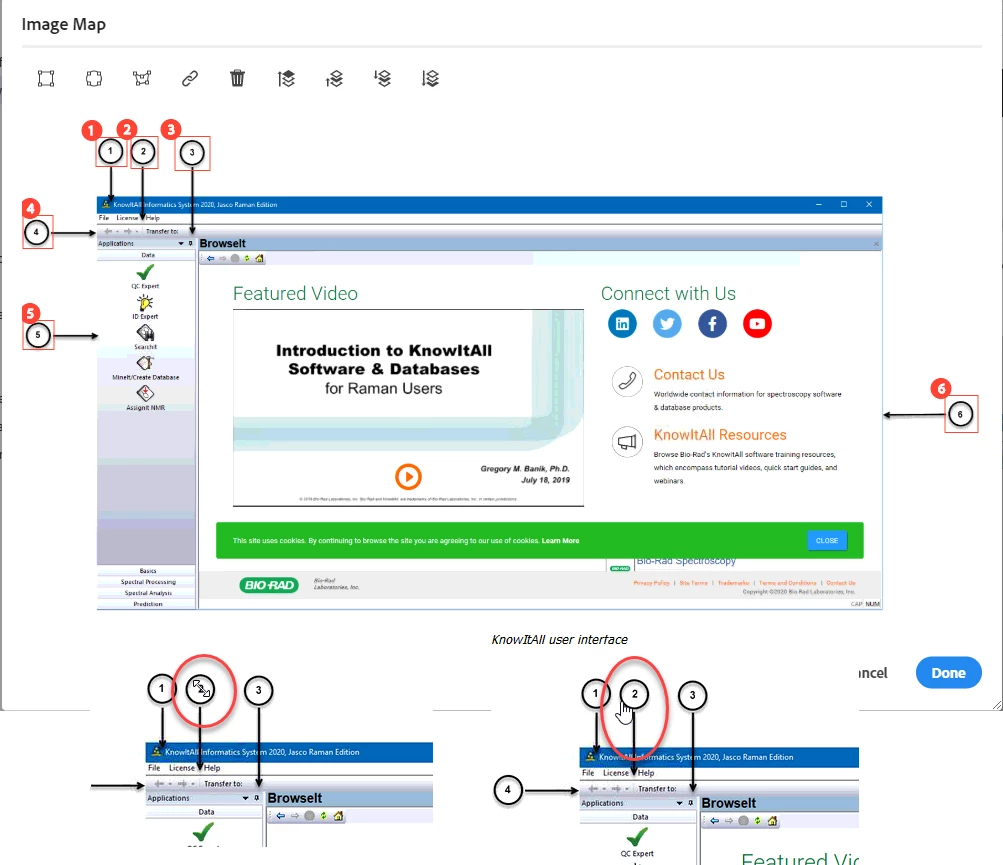
I totally understand that the Preview mode is not a completely accurate representation of the final output, but in this case, there is no correlation at all between where I define my image maps and where they wind up in the output. How on earth do I get properly defined image maps w/ this issue? I have attached a graphic to demonstrate this.
The top image shows the image map in RH. The bottom left shows where the image map should be, but when a cursor is held over it, you can see that the map is not there. Instead, the bottom right shows where the image map somehow winds up after generation. However, where I defined Image map #1 is just fine, but Image maps 3 through 6 also have somehow been "moved/set askew."
This is a HUGE issue for me as I have an ungodly number of necessary image maps for a very graphic heavy application.
TIA,
TVB
Edited by moderator to make text more digestible and attached image added to body of post.


 AdChoices