mauraa89901210
Known Participant
January 25, 2017
Answered

Image Not Aligning Properly

  • January 25, 2017
  • 2 replies
  • 301 views

I pasted a small icon-sized image into my RoboHelp project, and the image is on the same line as my text, however the image is raised up a bit from the text. I want the image to be nicely centered after the line of text. I've used the HTML editor and added IMG Align=middle, but this does nothing. I don't know how to do this in a style sheet, if that's the fix.

Here's what it looks like. I've also made it a hyperlink because it's a step in a process.

I appreciate any advice you can provide.

Thank you!
This topic has been closed for replies.
Correct answer Captiv8r

Hi there

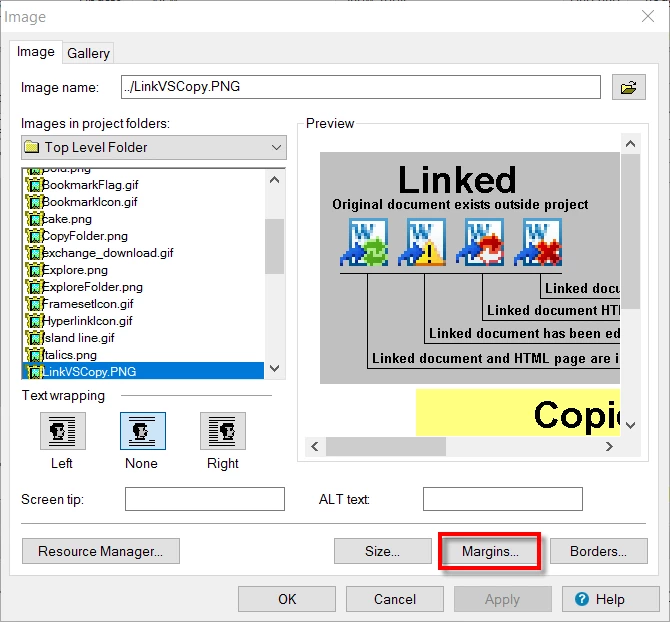
I see this all the time. What I do is to double-click the image so I see the image properties. Then click the Margins button.

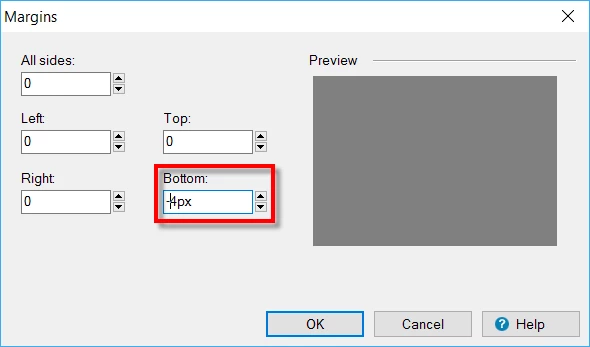
This should present the Margins dialog. Just click the up arrow on the spin controls to make it increment to perhaps four or five pixels, then click into the field and type a minus symbol ( - ) so it is before the number as shown below.

Click OK to dismiss the dialogs, preview and check. Repeat as needed.

Cheers... Rick

2 replies

Captiv8r
Captiv8rCorrect answer
Legend
January 26, 2017

Hi there

I see this all the time. What I do is to double-click the image so I see the image properties. Then click the Margins button.

This should present the Margins dialog. Just click the up arrow on the spin controls to make it increment to perhaps four or five pixels, then click into the field and type a minus symbol ( - ) so it is before the number as shown below.

Click OK to dismiss the dialogs, preview and check. Repeat as needed.

Cheers... Rick

Peter Grainge
Community Expert
Community Expert
January 26, 2017

In the Style Pod create an image style with a top margin that puts the image where you want it. See if that helps.


See www.grainge.org for RoboHelp and Authoring information

@petergrainge

Use the menu (bottom right) to mark the Best Answer or Highlight particularly useful replies. Found the answer elsewhere? Share it here.