

isabelleg85447096
Inspiring
September 20, 2018
Question

Image problem opening a RoboHelp 2015 into RoboHelp 2019

  • September 20, 2018
  • 2 replies
  • 550 views

I upgraded from 2015 to 2019 (purchased). My file worked fine until I ran the WebHelp Output.  Now there are HUGE issues:

All 2015 images were .gif, 2019 now uses .png. In output the .gif images do not show.

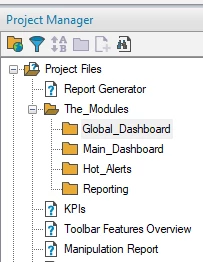
I opened the project to look into this and now any topics that were nestled in a folder inside the Project Manager are gone. In other words, I can no longer open the folders in the Project Manager to view or edit those Topics.
This topic has been closed for replies.

2 replies

Peter Grainge
Community Expert
Community Expert
September 20, 2018

The image you are showing with empty folders is from 2015 or 2017, not 2019.

PNGs are supported in 2019 but is that what you are using?

Peter Grainge

www.grainge.org

@petergrainge

Use the menu (bottom right) to mark the Best Answer or Highlight particularly useful replies. Found the answer elsewhere? Share it here.
Peter Grainge
Community Expert
Community Expert
September 20, 2018

... or are working with 2019 Classic?

Use the menu (bottom right) to mark the Best Answer or Highlight particularly useful replies. Found the answer elsewhere? Share it here.
Peter Grainge
Community Expert
Community Expert
September 20, 2018

Late here and I am about to log off.I had assumed you were using the new version of 2019 initially because of the thread you posted into.

Pretty sure you are now on 2019 Classic and there should be no upgrade issues with that.

I need to test the only thing that is coming to mind and I will do that in the morning.

Just confirm the version and we'll take it from there tomorrow.


See www.grainge.org for free RoboHelp and Authoring information.

@petergrainge

Use the menu (bottom right) to mark the Best Answer or Highlight particularly useful replies. Found the answer elsewhere? Share it here.
Peter Grainge
Community Expert
Community Expert
September 20, 2018

I have branched this into a new thread. I will respond later.

Use the menu (bottom right) to mark the Best Answer or Highlight particularly useful replies. Found the answer elsewhere? Share it here.
Peter Grainge
Community Expert
Community Expert
September 20, 2018

Please add the other information to this thread.

Use the menu (bottom right) to mark the Best Answer or Highlight particularly useful replies. Found the answer elsewhere? Share it here.