


Participating Frequently
April 5, 2016
Question

Images overwriting each other in Responsive Layout

  • April 5, 2016
  • 1 reply
  • 665 views

I was hoping someone could explain to me the logic around images in roboHelp.

I have a large number of images in my Online Help, the last time I needed to publish I found that a large volume of images were incorrect, they were in the wrong spot.

The images were not the right ones.

I found that there was a large amount of duplicate images in the roboHelp Project files, after some testing I found that:

  • Copying and pasting an image directly into roboHelp creates 1 file in the root directory image1.gif, image2.gif etc
  • Uploading images (from a Word document) creates a folder where the images for that document (topic are stored).  In this instance, a duplicate .png file is created for each image
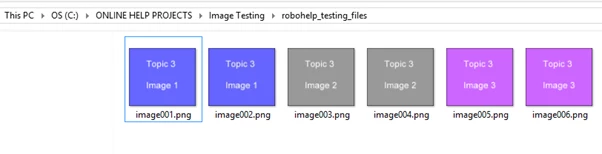
If you upload more it just keeps on adding images (with a duplicate)

  • I then created some images, saved them as JPEGs and added them to the Word document, I then uploaded those
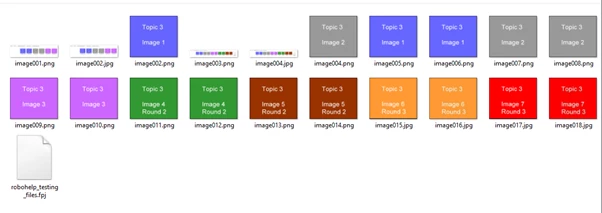
Now I am seriously confused and there are now 2 x image002 files one JPEG one PNG that are different images.

No wonder its getting it's wires crossed, has anyone got any ideas about:

  • best practice for, inserting, uploading vs copy/paste
  • naming conventions maybe??
This topic has been closed for replies.

1 reply

Peter Grainge
Community Expert
Community Expert
April 5, 2016

I have moved your post the RoboHelp HTML forum as the problem is not specific to the HTML5 layouts.

There are two issues here.

COPYING AND PASTING

There is another thread ongoing at the moment about pasting images into RoboHelp and Rick Stone has stated he always advises his students to insert saved images rather than paste. That is precisely because of this known problem that I believe you can avoid by saving after each paste. Try that to see if it helps. RoboHelp also saves the images in GIF format no matter what the format of the source image. That is being looked into.

WORD

Normally when you import a Word document, Word will put the images in a sub-folder before converting the document to HTML format so that RoboHelp can interpret it. I have never seen it create two images in the imported document, it should only be the PNG image in a sub-folder. Those images can be moved after import.

You must be following some other workflow so please explain step by step what you are doing, where you create the images and so on.


See www.grainge.org for RoboHelp and Authoring tips

@petergrainge

Use the menu (bottom right) to mark the Best Answer or Highlight particularly useful replies. Found the answer elsewhere? Share it here.
edu_KateAuthor
Participating Frequently
April 6, 2016

Hi Peter

Thanks for the guidance thus far, we very rarely copy and paste directly into roboHelp. I will avoid it from here on.

We author our online help in word and upload from there, very often replacing content that is there, with newer content.

I'll try and put my workflow into a more logical order.

1) Create a new blank project

2) Create a word document with some text (irrelevant) and an image

3) Load into new blank project

4) A folder is created containing the image (as you have outlined above), but 2 files are present. One PNG and one JPG

5) Going back to the Word document, a new image was added BEFORE the existing image (inserted in front of)

6) re-upload the Word document.

7) I now have 3 copies of the original image (2 x jpg and 1 x png) and one copy of new image

8) Repeat steps 5 and 6

9) I now have 4 copies of the original image (2 png and 2 x jpg), 1 copy of the second image (png) and 2 copies of the new image (1 x pmg and 1 x jpg)

Peter Grainge
Community Expert
Community Expert
April 27, 2016

I haven't abandoned you. I will take a look as soon as I can.


See www.grainge.org for RoboHelp and Authoring information

@petergrainge

Use the menu (bottom right) to mark the Best Answer or Highlight particularly useful replies. Found the answer elsewhere? Share it here.