August 25, 2014
Question

Images paste incorrectly

  • August 25, 2014
  • 1 reply
  • 368 views

After copying screenshot image and pasting into a topic, the image appears extremely low resolution (images and gradients - looks like living room blinds).
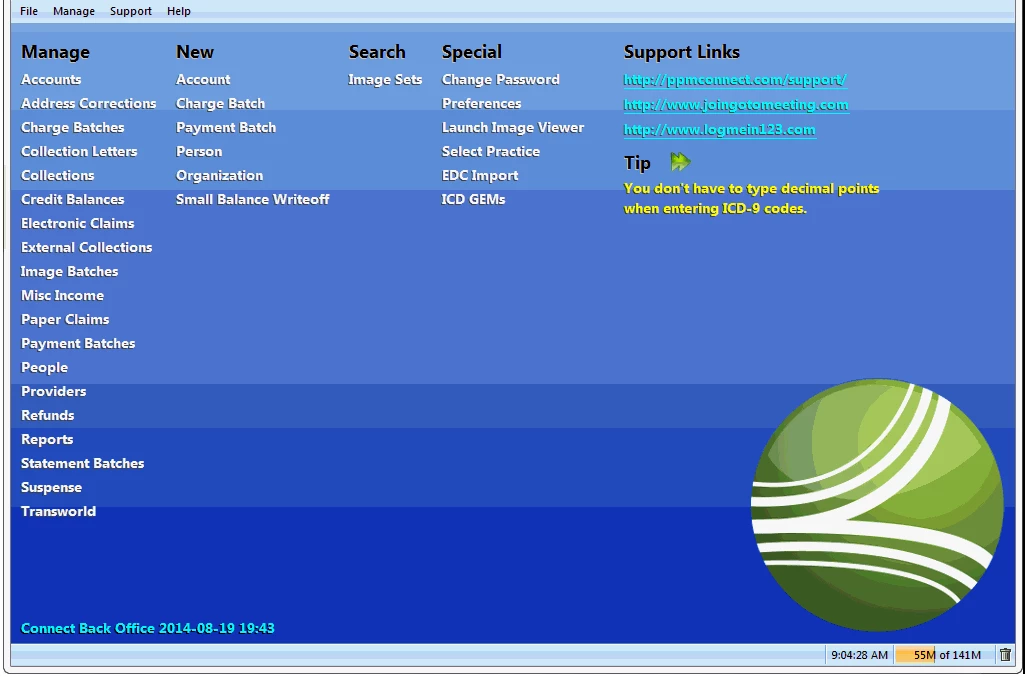

This topic has been closed for replies.

1 reply

Peter Grainge
Community Expert
Community Expert
August 25, 2014

Has the image been resized somewhere along the line?

What format is it?

What is the source of the image?

Which version of Rh?


See www.grainge.org for RoboHelp and Authoring tips

@petergrainge

Use the menu (bottom right) to mark the Best Answer or Highlight particularly useful replies. Found the answer elsewhere? Share it here.
August 25, 2014

No, it hasn’t been resized.

The image is placed in a temporary editor (Snagit editor – the file type is listed as “unsaved”). Previously, I had no problems just copying and pasting from the editor into RoboHelp.

The source is my company’s billing software (testing environment – live environment does the same).

RoboHelp 10

I read a post of another person with the same issue and discovered something they had….previously, if you pasted into RH, it would paste as a .jpg. Now, it’s pastes as a .gif. If you save the image from the Snagit Editor to the hard drive (as a .png for example), then right-click in the topic and choose the “insert image” option, it works perfectly. However, this adds several steps to the process. Screenshots of windows that don’t contain a dense gradient look fine with the traditional short method, so it’s a rare problem in my case, I just want to know why it’s different now.

Peter Grainge
Community Expert
Community Expert
August 25, 2014

The answer is along the lines I expected. You cannot control the format when pasting and what you are getting is just not supporting the way the image is created to start with. Sorry to say but I think you have to go through the steps to have it saved as a PNG that supports your image.


See www.grainge.org for RoboHelp and Authoring tips

@petergrainge

Use the menu (bottom right) to mark the Best Answer or Highlight particularly useful replies. Found the answer elsewhere? Share it here.