
Implementing Twisties in RH2015
Please bear with me, this is a bit messy due to the complexity of my troubleshooting in implementing Twisties.
I’ve been trying to implement the Twisty functionality for dropspots and expandspots in our RH2015 help projects and have come across several issues that I’m in need of support. Our ultimate goal is to have a single button or link at the top of each topic that expands and collapses all twisties in a topic.
I’ve tried implementing this functionality based on this post by Willam Van Weelden:
http://iconlogic.blogs.com/weblog/2013/07/adobe-robohelp-working-with-twisties.html
After setting my two image files for the twisties, the url’s are defined in the Description section of the Styles dialog box:
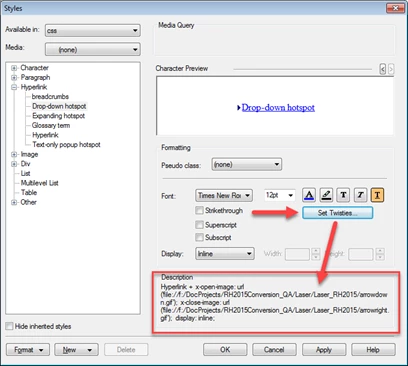
I click Apply, but once I click OK I get a Save As dialog box:
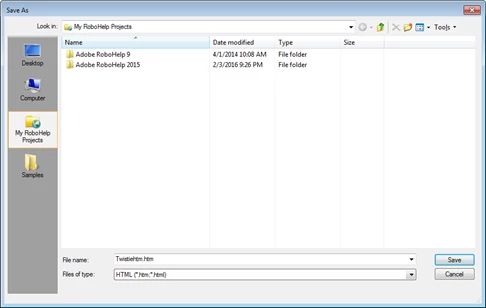
There’s nothing in Willam’s instructions regarding this dialog box, and I don’t know why I’m supposed to save a file or what the file is. Is this something new to RH 2015?
The default file type is HTML but you can also select the CSS file type from the File of type list. The default location is also confusing – why isn’t the folder location the same as the project’s location? I believe the file is supposed to be saved as a CSS file type. Why isn’t the style just being updated in the CSS file I’m using since that’s the file I’m trying to assign the updates to in my RH2015 project?
I saved the file, and opened it in a text editor to see what exactly it’s comprised of. I found it’s a “a.dropspot” styling for the twisty defining “x-open-image” and “x-close-image” each followed by their respective url image file locations as shown in the Description section of the Styles dialog box.
For example:
a.dropspot {
x-open-image: url("file://f:/DocProjects/RH2015Conversion/Laser/arrowdown.gif");
x-close-image: url("file://f:/DocProjects/RH2015Conversion/Laser/arrowright.gif");
display: inline;
}
I copied the style content into the same “a.dropspot” location of my project CSS. I tested several topics (Ctrl+W) and saw they were working for both text dropspots and image dropspots. I then generated a chm. When I reviewed the chm I found the twisties were functioning – but only for text links.
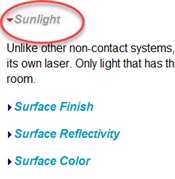
I have some dropspots that use “Information” images (small i icon shown below) but for some reason the twisties won’t show up for these images in a chm. I’m not sure if it’s because the image is at the end of a bulleted list item or some other reason:

I closed the chm and went back to my project. I did another review (Ctrl+W) of the text dropspot and found that it too no longer had the twisties. Jared Hess, a colleague, (also on these forums) suggested I make sure the two twisty images were still in my project, but we found that they were not. I have no idea what happened but apparently RH did its magic and for whatever reason deleted the two images from my project. I copied them back into my project, previewed a couple topics and they were there again and working.
To verify the above info image dropspot issue, I created a new dropspot using the same image on a standalone paragraph (not within a list). I generated a new chm monitoring the project folder where the two images are and as soon as the chm was finished being generated I notice that the two images disappeared from the project. I reviewed the topic I added the standalone dropspot on and they were working – all of them, even those within lists. I went to another topic that had dropspots on images and in lists, and they were not working. Apparently, the chm generation process removes them from the project and packages them in as part of the chm archive. By the way, I defined the two images as Baggage files. Jared also tried it, and the chm generation process removes the twisty images from his test project as well.
I copied the two image files back into the project and this time generated a Web output.
The two image files remained in the project folder and were copied into the Web output folder, but when I went to view the Web output, the twisties were not working. The drop-down functionality worked, but the twisty images were missing.
The Twisty functionality is so buggy and impossible to implement I don’t understand how Adobe can include this in their product. If it’s not easy to implement and has major bugs why release it into the product?
We have many dropspots in one very large project which has htm files in the root of the project as well as in sub-folders. They are all styled with the same CSS found in the root of the project. We would like an easy way to implement this twisty functionality. We thought Willam’s approach would do this, but we are running into too many obstacles.
Please, if anyone else has had success implementing the Twisty functionality in their project in RH 2015, please provide a detailed step-by-step account of your process.
As always, your help is greatly appreciated.
Steve Roehrig


 AdChoices