



Chris Dant
Participating Frequently
March 17, 2021
Answered

Imported MS Word List Problem

  • March 17, 2021
  • 5 replies
  • 277 views

When I import an MS Word file with a bulleted list, the next topic begins inside a bulleted list and it should not. In addition text following a bulleted list is indented when it should not be. Following a bullet list with a table fixes the bullet problems. I remember reading an article about preventing bullet list problems using Word, probably on the excellent grainge.org, but I can't it again and I don't remember it addressing this simple case.


I'd say I've overlooked something but this is such a simple case I can't think what it might be. Any pointers or direction would be appreciated.


My notes below - thanks for looking.


Thanks,
Chris 


I tested this with a new blank Word document, and created a new RH project.


The Word document looked like this. with the "Topic" lines being Heading 1s.
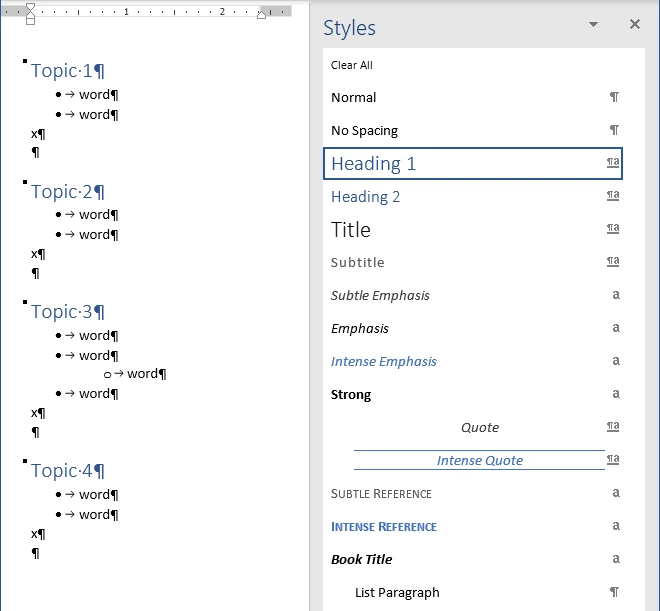
 

I import this document into a new, blank RH project (2020.3.32) specifying Start new topic from style, Word Style, Heading 1, and this produces the 4 topics I'd expect in this example.


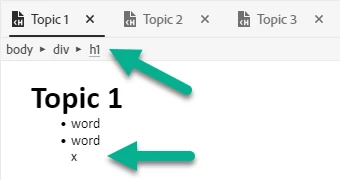
Topic 1 looks like this, with insertion point before the text of the header, showes the correct HTML tag hierarchy, but text following the list (a paragraph containing just the letter "x") is idented incorrectly.
 

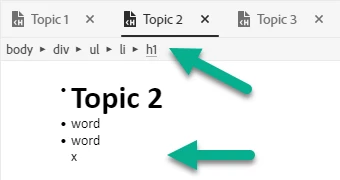
Topic 2 starts wrong as shown here with the insertion point before the text of the header. The H1 for the topic is inside an LI tag. Text following the list continues to be indented incorrectly.

  

    This topic has been closed for replies.
    Correct answer Peter Grainge

    I am not sure what is causing this but it looks like it is fixed in the update due soon.

    ________________________________________________________
    See www.grainge.org for free Authoring and RoboHelp Information

    5 replies

    Chris Dant
    Participating Frequently
    March 18, 2021

    Thanks for taking a look.

    Peter Grainge
    Community Expert
    Peter GraingeCommunity ExpertCorrect answer
    Community Expert
    March 18, 2021

    I am not sure what is causing this but it looks like it is fixed in the update due soon.

    ________________________________________________________
    See www.grainge.org for free Authoring and RoboHelp Information

    Use the menu (bottom right) to mark the Best Answer or Highlight particularly useful replies. Found the answer elsewhere? Share it here.
    Chris Dant
    Participating Frequently
    March 17, 2021

    Yes, that was the page I couldn't find. Looking at it again I see mention of "Convert Word Lists to HTML Lists" which I am doing. I am doing nothing regarding styles; I just want the tag heirarchy to make sense at this point. I'll work on styles once I have a workable import. 


    The RH version is 2020.3.32, which appears to be 2020.


    I'll send you the zip of the test project and the Word document.

    Peter Grainge
    Community Expert
    Community Expert
    March 17, 2021

    Is this what you read. Importing/Linking Word/Fm Docs (grainge.org)


    There is a separate 2019 version there as well.

    ________________________________________________________
    See www.grainge.org for free Authoring and RoboHelp Information

    Use the menu (bottom right) to mark the Best Answer or Highlight particularly useful replies. Found the answer elsewhere? Share it here.
    Peter Grainge
    Community Expert
    Community Expert
    March 17, 2021

    @Chris Dant That looks like the new UI but 2019 or 2020, I can't tell and you haven't said.


    Create a zip of the test project and the Word document. Then see my Contact Page for instructions on how to send it to me.

    ________________________________________________________
    See www.grainge.org for free Authoring and RoboHelp Information


    Use the menu (bottom right) to mark the Best Answer or Highlight particularly useful replies. Found the answer elsewhere? Share it here.