

ColdForest
Inspiring
December 9, 2016
Question

Imported Word Document Not Resulting in any Pagination/Topics

  • December 9, 2016
  • 2 replies
  • 2666 views

I have a simple test project that I'm creating with an imported Word document (also a simple document - 40 odd pages). I've done this in order to try to troubleshoot why the import isn't correctly creating new topics based on my "Heading 2" pagination setting.

I've come to this (I'm new to RoboHelp) after my first importation attempt created only a single new (top-level) topic. In this case the entire content of the the document was put inside this top-level topic. I finally read enough to find out how RH does pagination/new topic creation on import and so I went ahead and set this in the import Conversion Settings dialog:
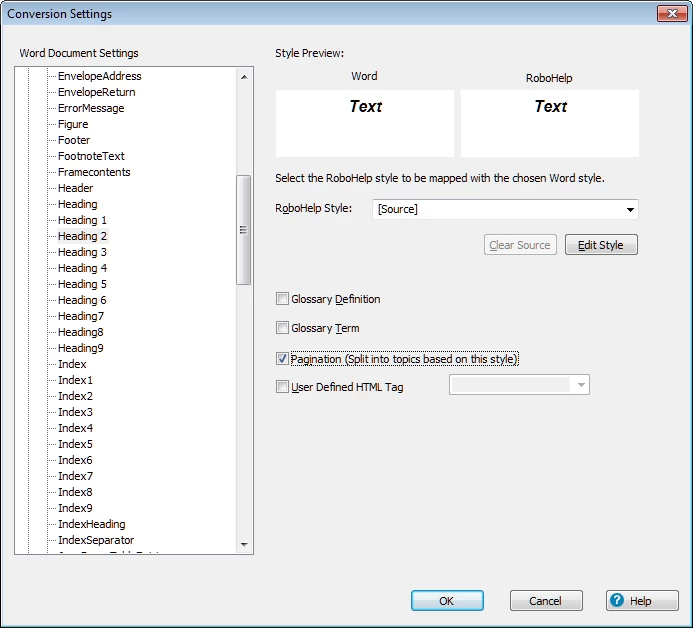
However, after running the import again (in a brand new project) I see that there is still only a single resulting topic. TOC, index, etc are all created correctly, but not the topic pagination aspect. Generating the Responsive HTML5 output confirms this since search only ever returns a single result (since everything is contained within a single topic).

What am I doing wrong??

This topic has been closed for replies.

2 replies

EmanAssem
Inspiring
January 10, 2017

Hello,
Please make sure that the Word TOC is reflecting the structure you need, and then after importing, check the TOC in RH.

ColdForest
Inspiring
January 10, 2017

EmanAssem wrote:

Hello,
Please make sure that the Word TOC is reflecting the structure you need, and then after importing, check the TOC in RH.

What are you refering to here? As mentioned earlier in the thread (i.e., "...I was able to work through the detailed pagination item I was seeing...") the pagination issue has been worked around (and an outstanding support issue created with RH support - regarding pagination and "Convert work list to" settings).

Peter Grainge
Community Expert
Community Expert
January 12, 2017

Are you willing to privately share the source document with me? See the Contact page on my site and send the document as instructed there. Do make sure you include a link to this thread and please do not email the document direct.


See www.grainge.org for RoboHelp and Authoring information

@petergrainge

Use the menu (bottom right) to mark the Best Answer or Highlight particularly useful replies. Found the answer elsewhere? Share it here.
Captiv8r
Legend
December 9, 2016

Hi there

You may not be doing anything wrong. Often we encounter Word documents where the Word user has no clue whatsoever of how to properly apply styling such as Heading levels. Have you opened the document and ensured that each place where you would hope to see a new topic created that it is formatted as a Heading Two in Word before you import?

Cheers... Rick

ColdForest
Inspiring
December 9, 2016

Hi Rick,

Ah, yes , the document has the expected styles (indeed these styles only show up in the conversion settings based on the detected styles in the source document). I also see these styles in the single resulting topic when perusing the HTML. So there must be something else in play here - ideas? Maybe there's some other setting in my import settings that confuse these pagination requests?

Thx, -David

Inspiring
December 9, 2016

When I started down this road of working with Word & RoboHelp, I studied Peter Grainge's page - Importing Using RoboHelp 9, 10 and 11  - about Word & RoboHelp. The information on that page & the sample project were helpful to me and once I got the styles mapped, it's cake by the ocean. Hope that song doesn't get stuck in your head, but it just finished on my playlist...

Paul Hanson