
Importing/adding html files with bookmarks to project/TOC
Overview:
I've been importing some old html files that have a massive number of bookmarks/anchors in them (few hundred html 'pages' some of them mini help document libraries) in an effort to move the manuals into RH format. Using RH11
Problem:
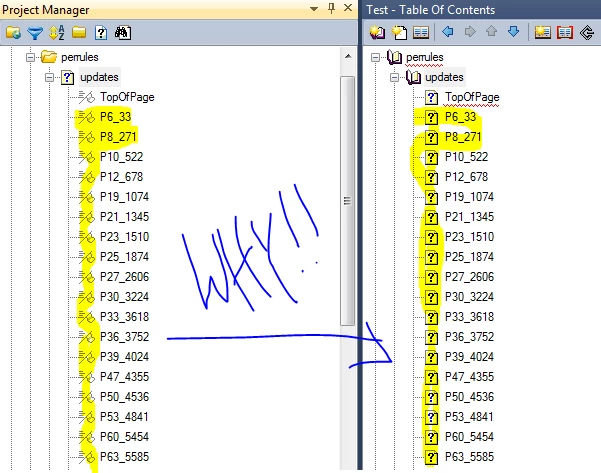
when I import them all the bookmarks are showing up under each topic page. Second, when I add a folder into the TOC or auto generate a TOC it pulls each bookmark as a page (see screen shot). Any way I can get around this issue? I can manually add (drag/drop) the 'updates' page here into the TOC and it doesn't pull the bookmarks as pages. However i'm interested in knowing if I can simply not import the bookmarks or exclude them from populating as pages in the TOC. This seems to be new to RH11 (i've used RH9 without this issue in the past, on a similar project).
System;
RH11
Office 2013
SharePoint 2010
Thanks


 AdChoices