

SandraDCF
Known Participant
August 3, 2017
Question

Importing .docx files into RoboHelp 2015

  • August 3, 2017
  • 3 replies
  • 1068 views

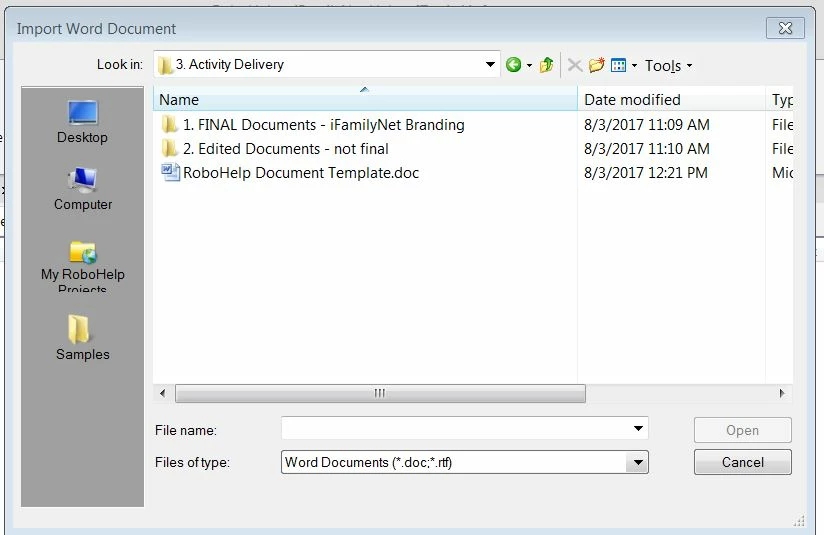
Hi! I cannot import .docx files into RoboHelp 2015. When I go to locate the file on my drive via Import --> Word Document in RoboHelp, these documents do not show up as a recognized file type. Only .doc files show up.

In the example below, I had converted a .docx file into a .doc file. Both versions (the .docx and the .doc files) are located in this folder, but the .docx file is not visible.

Does this mean I will need to convert every single .docx file into a .doc file before I can import it into RoboHelp?

I am using Word 2010.
This topic has been closed for replies.

3 replies

SandraDCF
SandraDCFAuthor
Known Participant
August 4, 2017

The workaround would be for me to simply convert these documents all to .doc files. But since the default file type has been .docx starting with Microsoft Word 2007, I'm a little worried that this could cause compatibility issues down the road.

Peter Grainge
Community Expert
Community Expert
August 4, 2017

I'll see if I can find anything.

Use the menu (bottom right) to mark the Best Answer or Highlight particularly useful replies. Found the answer elsewhere? Share it here.
Captiv8r
Legend
August 3, 2017

Hi there

If you look at the bottom of that dialog, you see only DOC files listed. Try clicking that drop-down and seeing if DOCX files are listed.

Alternatively, you can just click all files. Or even type *.DOCX into the file name field and press enter to see only files of that type appear.

Cheers... Rick

SandraDCF
SandraDCFAuthor
Known Participant
August 4, 2017

Thanks, Rick! I tried but, for some reason, .docx is not listed as a file type, even when I look under All Files:

Peter Grainge
Community Expert
Community Expert
August 3, 2017

I have moved your post to RoboHelp HTML as RoboHelp for Word is a separate program that no longer ships. If you are using RoboHelp 2015, you are not using RoboHelp for Word.

Have you applied the available updates? If not, you only need to apply the last one. See Adobe - Support : RoboHelp Support Center : Service Releases

Try that and post back.


See www.grainge.org for RoboHelp and Authoring information

@petergrainge

Use the menu (bottom right) to mark the Best Answer or Highlight particularly useful replies. Found the answer elsewhere? Share it here.
SandraDCF
SandraDCFAuthor
Known Participant
August 4, 2017

Thanks, Peter! I applied the latest update, Adobe RoboHelp 2015.0.4. Then I spoke with a customer service rep from Adobe who did the following, to reset the preferences for Office and Robohelp:

  • Made a change to the Registry (RoboHelp settings)
  • Ran a repair of Microsoft Office Professional Plus 2010

However, this still did not address the issue. So I uninstalled RoboHelp 2015 and then reinstalled it. That didn't work either.