
Importing Excel tables into RoboHelp
This procedure worked with RoboHelp 8.0.2, Microsoft Office 2003 and Windows XP. It should be OK for other versions and for OpenOffice but I can't test that here.
My developer proudly gave me a list of 200 error codes as an Excel table with four columns: Number, Description, Source, Possible Solution. Top-class stuff for a service manual, but it meant 800 rounds of Tab Ctrl-C Alt-Tab Tab Ctrl-V Alt-Tab. Being naturally lazy I decided to try an easier way.
In RoboHelp I created a simple table of 2 rows and 4 columns. I formatted the cells as Normal and looked at the HTML.
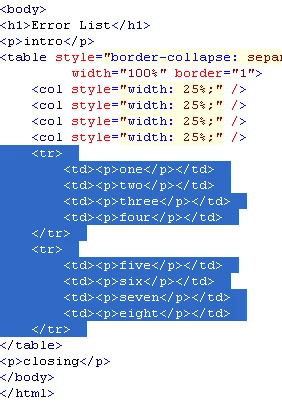
The Table Row <tr> and Cell <td> structure is easy to see; Each row begins with
<tr><td><p>
Between each cell is
</p></td><td><p>
Each row ends with
</p></td></tr>
First I `cleaned' my Excel sheet; I used Replace All to replace all commas with a string "COMMA". I also replaced ampersands "&" with the html "&" and then replaced greater-than ">" with ">" and less-than "<" with "<"
Then I inserted columns in the spreadsheet and filled them with the HTML table structure described above. I saved the Excel sheet as a comma-delimited file CSV.
I closed Excel and opened the CSV file with a text editor (Notepad).
I used Replace All to remove all commas (inserted by Excel); then restored the real commas by replacing the string COMMA.
Then I copied the entire contents of the file onto the clipboard, and pasted it into the HTML to replace my dummy rows.
That was it! RoboHelp accepted the transplant and I could format the header rows and set column widths in the normal way.
Dear RH and HTML gurus reading this: is my procedure safe? or will something come back to bite me later?
--- Derek


 AdChoices