


Known Participant
January 18, 2012
Question

Importing Pdf in Robohelp

Hi

I am facing a problem in importing PDF in Robohelp9.Few words in some lines are corrupted.


Steps I followed:


1:I created a PDF from a word doc 

2:Imported pdf in the robohelp9

3:Topics are generated successfully but in some of the topics few word are corrupted like If any sentence in PDF is ' Click on' followed by an image'  after conversion by robohelp  Click here is distroyed by a series of boxes and images is as it is 

The below screen shot depicts the problem.
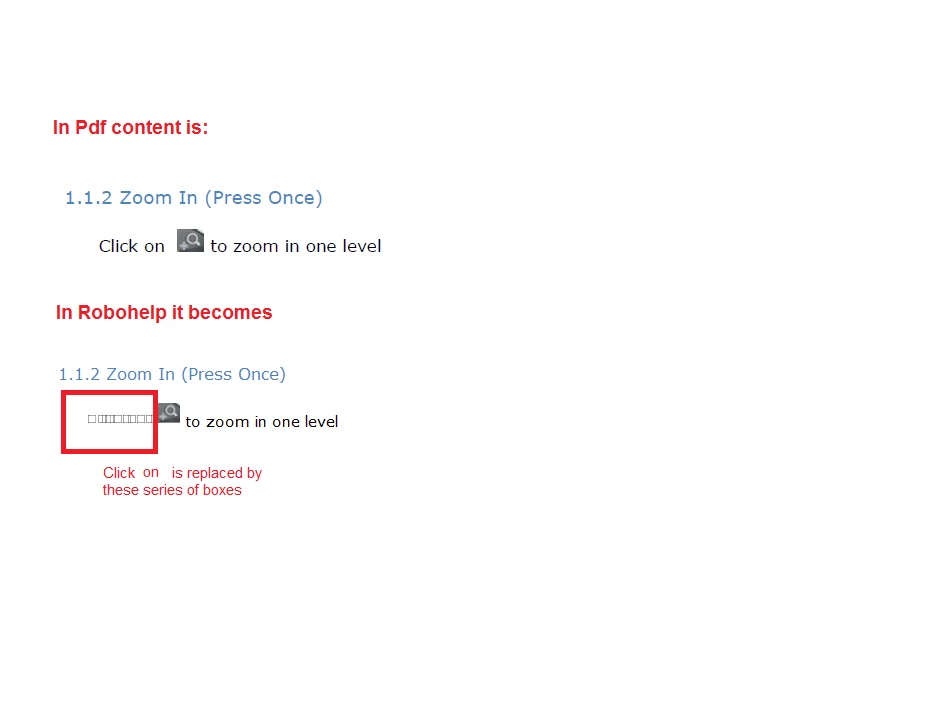


Please provide help


Thanks

This topic is closed to new replies. Start a new post to keep the conversation going.

4 replies

Participating Frequently
January 18, 2012

How you have inserted images in the document. I think there is some issue in that procedure.

Ideally you should insert image as object in word document.

Have a nice day

Cheers

Translate
Peter Grainge
Community Expert
Community Expert
January 18, 2012

I have to ask why you are importing from the PDF rather than the Word document? I think the latter might give better results.

One possible reason is that the link in Word was a cross reference rather than a hyperlink.

Also in the link that has worked it looks like there are two spaces after Click On.

BTW. You press keys on a keyboard, you click images and links on the screen.


See www.grainge.org for RoboHelp and Authoring tips

@petergrainge

Translate
Use the menu (bottom right) to mark the Best Answer or Highlight particularly useful replies. Found the answer elsewhere? Share it here.
Known Participant
January 18, 2012

Thanks Peter for your response

I tried to use word document but it creates only one topic. Is there any way to get the topics based on style as the option available in importing pdf.

Translate
Peter Grainge
Community Expert
Community Expert
January 18, 2012

Yes. See the Importing topics on my site.

You need to set the pagination, probably just for Heading 1.


See www.grainge.org for RoboHelp and Authoring tips

@petergrainge

Translate
Use the menu (bottom right) to mark the Best Answer or Highlight particularly useful replies. Found the answer elsewhere? Share it here.