


Participant
March 17, 2021
Question

Importing Word doc to RH 2020 - where oh where are my character styles?

  • March 17, 2021
  • 5 replies
  • 297 views

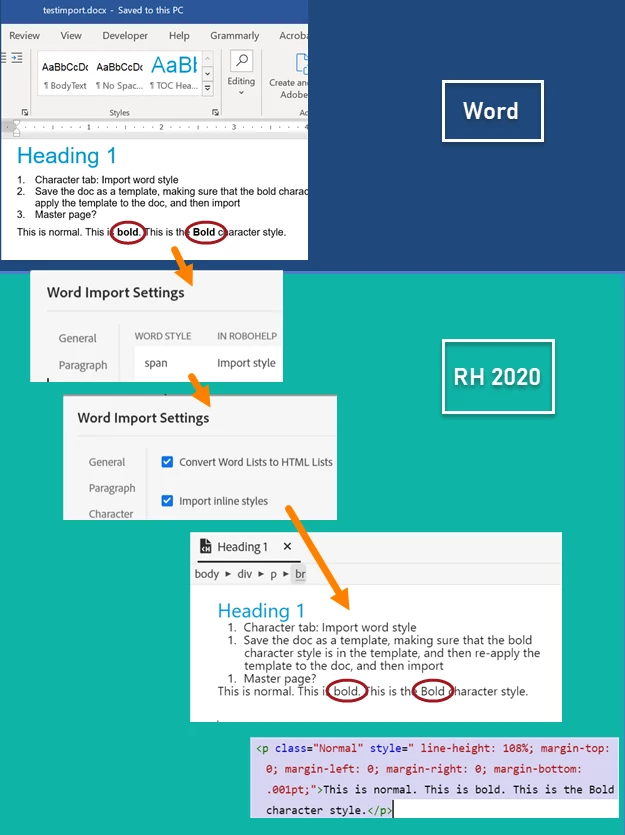
So we are doing a trial of RH 2020 (we've been using 2019 for a couple of years and have recovered from the shock, mostly). When testing an import from Word to RH, everything works as expected EXCEPT the character styles and in-line formatting, which appear to be completely ignored. One problem is that the only available character style that RH seems to detect is "span." 

What I've tried, with no success:

  • Formatted content both in-line and using a character style in Word.
  • Used the template organizer in Word to confirm that my character style does, in fact, exist in the template that is attached to my doc.
  • Saved the Word document as a template, and then applied the template to the same document (this was a Hail Mary, and it failed).
  • Tried to import a couple of different docs.
  • Checked Mr. Grainge's site.
  • Read the RH User Guide.
  • Wine.

Thanks very much for any light you can shine on this issue. Here's an infographic!
 

    This topic has been closed for replies.

    5 replies

    Peter Grainge
    Community Expert
    Community Expert
    April 20, 2021

    In Update 4 styling such as Bold or Italic applied from the toolbar in Word does import in Update 4 if Use Inline Styles is selected. If Word's Strong character style has been applied, that will show in Character styles in Word.

    ________________________________________________________
    See www.grainge.org for free Authoring and RoboHelp Information

    Use the menu (bottom right) to mark the Best Answer or Highlight particularly useful replies. Found the answer elsewhere? Share it here.
    Peter Grainge
    Community Expert
    Community Expert
    April 8, 2021

    @AHawley 

    You have failed to offer up any chickens! Please try all options before coming to the forum. 🙂 

    Create a simple Word document and include the bits that are failing for you. In the document as well as including some bold text, italics and whatever, add a paragraph saying those items in the next paragraph will fail. After checking they do fail, send me the document. See the Contact page on my site and in this case just attach the document to the email.

    I'll see what I can come up with. 


    @MaryEAD 

    Apply Update 4 and see how you get on. It has out for a couple of weeks. Usually margins are because of the styles applied in Word and should be lost if you map to the right styles in RoboHelp.

    ________________________________________________________
    See www.grainge.org for free Authoring and RoboHelp Information

    Use the menu (bottom right) to mark the Best Answer or Highlight particularly useful replies. Found the answer elsewhere? Share it here.
    Peter Grainge
    Community Expert
    Community Expert
    March 24, 2021

    Days rather than weeks.

    ________________________________________________________
    See www.grainge.org for free Authoring and RoboHelp Information

    Use the menu (bottom right) to mark the Best Answer or Highlight particularly useful replies. Found the answer elsewhere? Share it here.
    Jeff_Coatsworth
    Community Expert
    Community Expert
    March 24, 2021

    Hmm, so it looks like it's ignoring that "Import inline styles" flag (use of which is generally not a best practice, but nevermind). If you can wait for patch 4 in a couple of weeks, that might be fixed, otherwise file a bug in the Tracker (https://tracker.adobe.com/) now & see if it's already been addressed in patch 4.

    Participant
    April 8, 2021

    Did you also notice that import also applied the "margin-bottom: .001 pt" tag to the text in AHawley's info graphic?

    It doesn't seem likely that this was coming from the original template style. 

    Where does it come from? 

    From my own experience that spacing was added to the .css created during the Word import. The .css was applied to all the resulting topics and caused bad spacing when I exported to Word. 

    Was this also addressed in the planned release?


    Jeff_Coatsworth
    Community Expert
    Community Expert
    March 18, 2021

    What point version of RH2020 are you using?

    AHawleyAuthor
    Participant
    March 24, 2021

    2020.3.32

    Sorry it's taken so long to reply - minor surgical procedure took longer to recover from than anticipated! Thanks for your patience!