

Importing Word files into RH 2022 with Multilevel lists
I am neediing to import several hundred Word files into Robohelp 2022 and the majority of these files have Bulleted list, numbered lists and multilevel lists (75% of the source files I will be importing will containt one or all 3). I'm the only p erson to work in these source files and I'm the one who setup the list style in Word for the multilevel list and created the styles for the different levels of the bulleted and numbered lists.
For the multilevel list I created a list style in Word called KEES Multilevel List and inside this list style, I set up levels 1 -4 for the number formats and placement and linked each of thse levels to Word styles that I also created called ParaNum1, ParaNum2, ParaNum3 and ParaNum4. So, in effect, the list style controls the number alignment and format and the ParaNum1-4 controls the text settings for after the number and the 2nd line wrap settings for each level.
I've imported a few of these files into Robohelp 2022 and I want it to use the format of the styles I created in Word, so on the import, I chose to Import Style from Word into Robohelp. From there, I copied the styles from the topic CSS into my project CSS using Source preview in Robohelp.
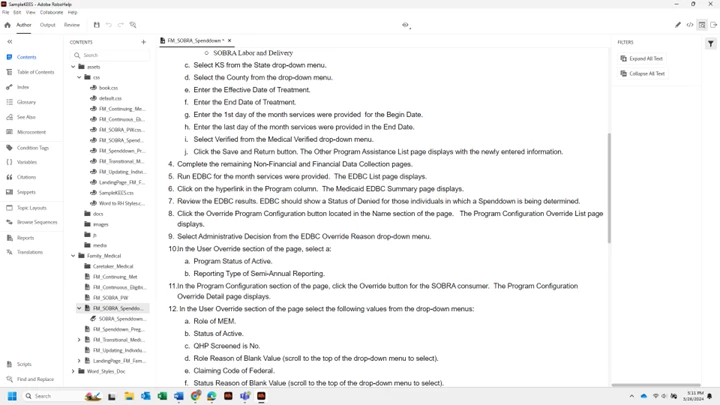
I'm noticing that in Robohelp it looks a little different when I preview it from what it does in Word Web Layout view. My question is: is this the correct way to imort these Word documents? Is there a better way? I've read tons of articles and other people's questions and answers to Mujltilevel list issues, but I'm not convinced I am doing this the easiest way or the best way. Maybe I am. I'm just finding that the numbers in the multilevellists get weird once we hit 2 digit number such 10, 11, 12, etc. Before I spend 6 hours tyring to figure out how to make that not happen RH (I kmow how to control that in Word), I thought I would ask first. I
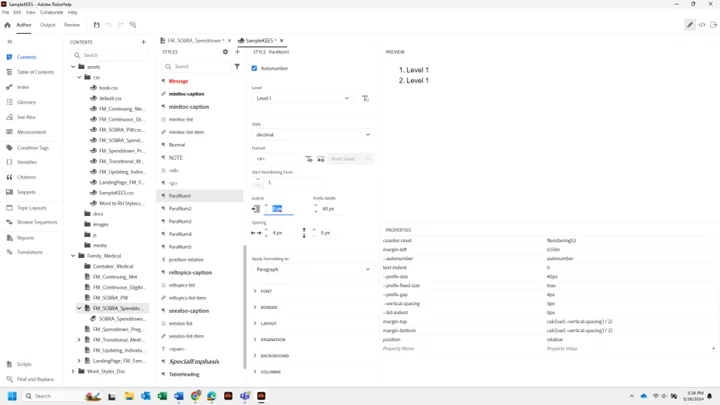
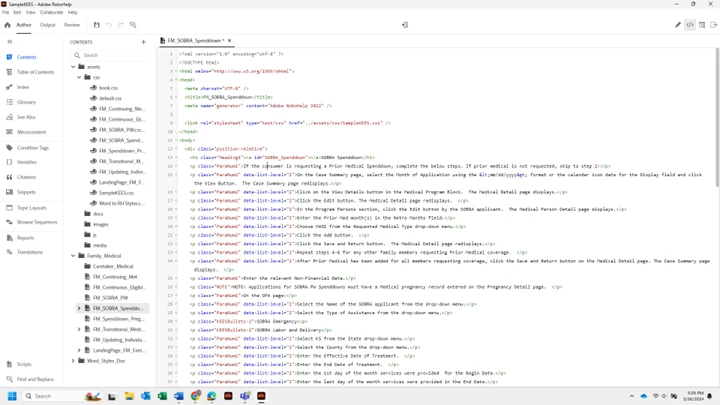
'll attach a screenshot of my source code and one of what it looks like when I press the Preview button in RH, which I assume will look the same as the output will look. Last question which is so frustrating, all of the formatting options in RH are in px and my indents are in inches in Word. So, for example, if I want a .5" space between my number and the text how do I put that into RH? Everytime I put it into the indent field in myh RH Style, it changes to 0 and it's bc it wants pixels or pts, I guess???? I'm not sure how to convert that so RH knows what I want (hopefully that makes sense).
 Thank you in advance!!


 AdChoices