Known Participant
August 19, 2011
Question

Improper index display in RH Server on Firefox, Chrome

  • August 19, 2011
  • 1 reply
  • 750 views

I'm running into something where the index of my Webhelp Pro output displays incorrectly in Firefox (using 3.6.14) when the output is hosted on RH Server. The same help accessed locally looks just fine. In addition, the help looks fine both locally and remote when viewed in IE8. I run into the same problem on Chrome (13.0.782.112) as on Firefox.

Using RH Server 9 and TCS 3.

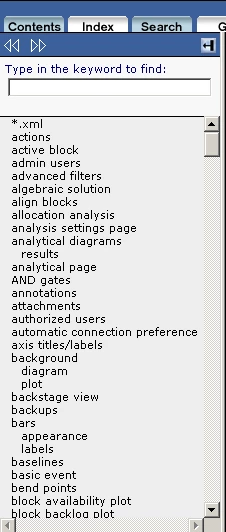
What it should look like:
The incorrect display:
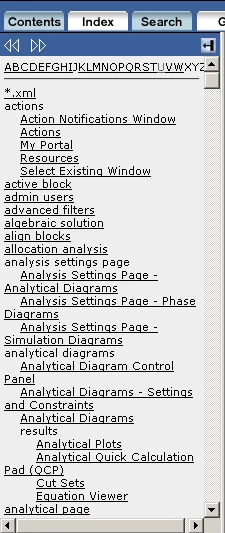
For any index entry that has more than one topic associated with it, the topics themselves are displayed as links within the index.

Any ideas would be greatly appreciated.

This topic has been closed for replies.

1 reply

Captiv8r
Legend
August 19, 2011

Hi there

From what I'm seeing it appears the help is "falling back" and downgrading to "Pure HTML" where everything is a link.

Have you perhaps disabled JavaScript in Firefox or maybe have some add-ins that are conflicting? I think I'd be investigating your Firefox settings and try disabling any add-ins.

Cheers... Rick

Helpful and Handy Links

RoboHelp Wish Form/Bug Reporting Form

Begin learning RoboHelp HTML 7, 8 or 9 within the day!

Adobe Certified RoboHelp HTML Training

SorcerStone Blog

RoboHelp eBooks

Known Participant
August 19, 2011

Thanks, Rick.

Well, I've upgraded to Firefox 6 (which is nice, can't think why I hadn't done THAT before!). Issue persists. I've tried killing add-ons, to no avail. Definitely haven't disabled JavaScript.

What's weird about this is that it happens only to the one hosted on RH Server. The local one is totally fine, so I can't imagine how it could be Firefox settings...

Melinda