
Known Participant
April 15, 2019
Answered

In Indigo layput, I cannot see TOC "Contents" in the menu

  • April 15, 2019
  • 1 reply
  • 1762 views

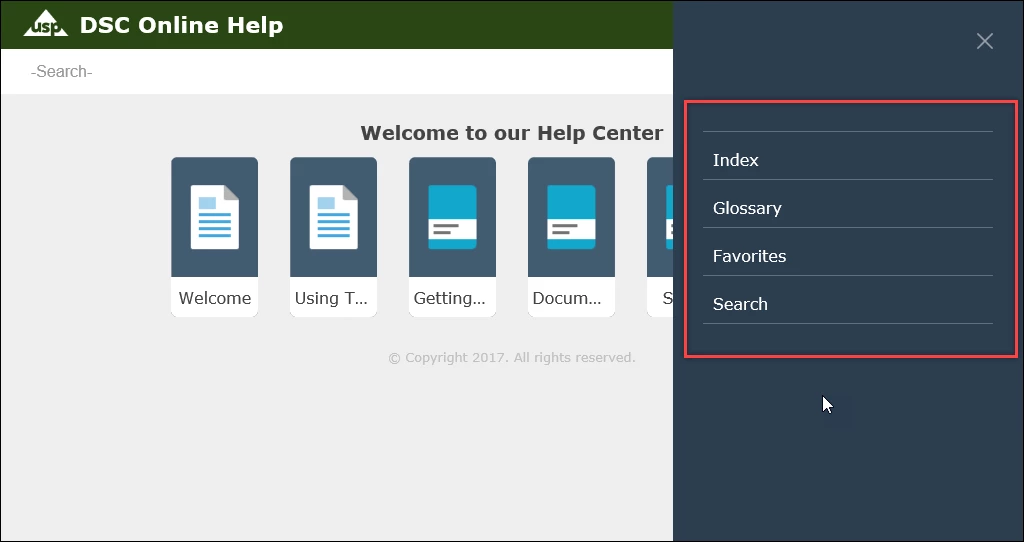
I'm using RoboHelp 2019 and I used Indigo template to compile my help. I do not see the Contents option in the menu. See the following screen. Am I doing something wrong? How can I see the TOC where I can browse for topics? Please help,
This topic has been closed for replies.
Correct answer Amebr

The TOC is showing in the main topic pane in Indigo. It will show in the sidebar after you click into a topic (for example, Welcome, or a topic inside the "Getting Started" book)

1 reply

AmebrCommunity ExpertCorrect answer
Community Expert
April 16, 2019

The TOC is showing in the main topic pane in Indigo. It will show in the sidebar after you click into a topic (for example, Welcome, or a topic inside the "Getting Started" book)

jayapAuthor
Known Participant
April 16, 2019

Thanks! It did solve my problem, but in the preview of the Indigo template, it shows that the "Contents" will be available in the menu bar where it is shown in the screen above. So this might be something the Adobe should fix.

It would be so convenient, if it showed like that. It's frustrating now to look for TOC by clicking on a topic and then seeing the TOC. I hope this is resolved soon.

Community Expert
April 16, 2019

Could you post a screenshot of what you mean by the preview? Do you mean when you are editing the skin?