Known Participant
Dec 1, 2015 3:29 PM UTC
Answered

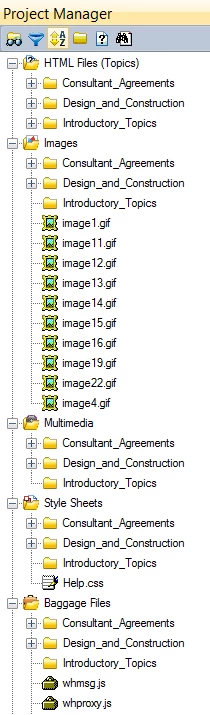
In Project Manager, the file folders under HTML Folders are duplicated in the Images, Multimedia, Style Sheets and Baggage folders. How did this happen? The duplicated folders and subfolders are empty but cannot be deleted.

I'm using RH 11.0.4.291. Has anyone experienced this before (see screen capture)? I want to fix this so I don't leave it for future tech writers. Any suggestions are appreciated.
This topic is closed to new replies. Start a new post to keep the conversation going.
Captiv8r
Captiv8rCorrect answer
Legend
Dec 1, 2015 4:42 PM UTC

Oh, and it occurs to me that the article I steered you to is pretty old (but still relevant).

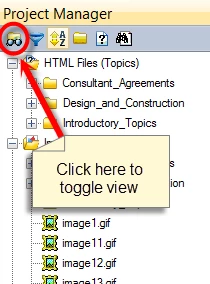
The "fix" for it is to click the icon shown below to toggle the Project Manager view.

Cheers... Rick

3 replies

Captiv8r
Legend
Dec 1, 2015 4:20 PM UTC

See if the link below helps...

Click here to view

Cheers... Rick

Translate
Captiv8r
Captiv8rCorrect answer
Legend
Dec 1, 2015 4:42 PM UTC

Oh, and it occurs to me that the article I steered you to is pretty old (but still relevant).

The "fix" for it is to click the icon shown below to toggle the Project Manager view.

Cheers... Rick

Translate
brickerdAuthor
Known Participant
Dec 8, 2015 1:12 PM UTC

Thanks for your responses Rick. I would not have found that toggle.

Translate