

In RH 2019 Update 9 Responsive HTML5 output, certain characters not displayed in search result
Hi Everyone,
I use Adobe RoboHelp 2019 Update 9 (Version 14.0.9) including the Hotfix from https://helpx.adobe.com/robohelp/kb/hotfix-for-robohelp-update-9-2019-release.html and encountered the following problem:
I have a simple html file "First_Topic.htm" which includes a text containing different characters.
(I slightly modified the file "First_Topic.htm" which was generated when creating a new RoboHelp project.)
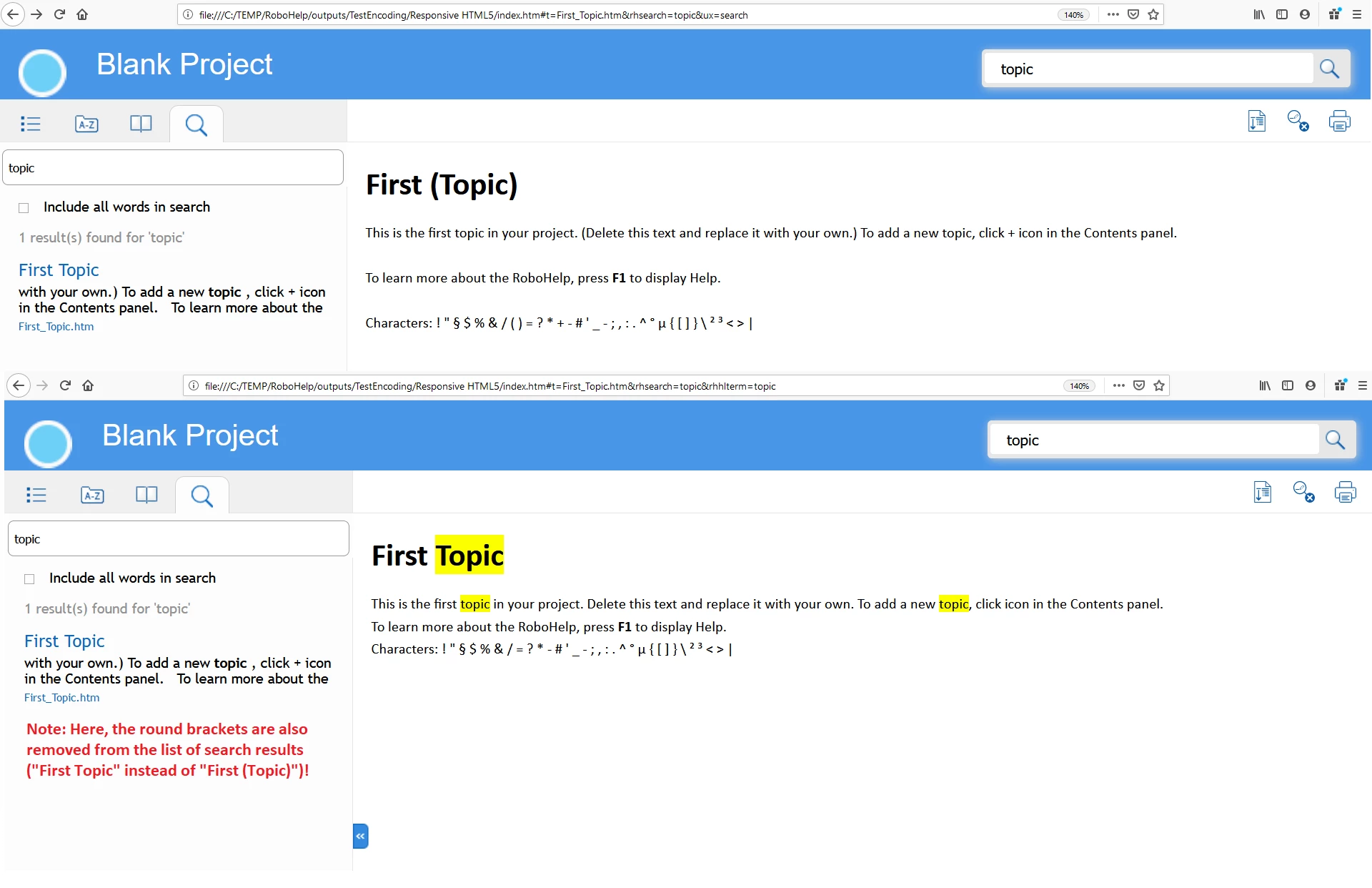
When I generate a Responsive HTML5 output and search for a keyword (e.g. "topic"), in the search result, characters like the plus sign (+) or round brackets are removed.
Furthermore, it seems that paragraphs (<p></p>) are removed as well or at least will be displayed with a smaller margin.
I currently only encountered the problem in the context of plus signs, round brackets, and paragraphs, but other characters and html tags may be affected as well.
I attached a picture to illustrate the problem showing the original content and the content after clicking on the search result.
I tested it with Mozilla Firefox, Internet Explorer, and Edge. The problem occured in all browsers.
I tried to set "Encoding" to "Unicode(UTF-8 without BOM)" in RoboHelp, but that did not change the behaviour.
I assume that the problem has something to do with encoding and the JavaScript logic used by the search functionality of RoboHelp.
During my analysis of the problem, I opened the Web Console of Firefox and, among others, encountered the following error messages:
Empty string passed to getElementById(). layoutwidgets.min.js:5:29350
Empty string passed to getElementById(). layoutwidgets.min.js:5:29394
The character encoding declaration of the HTML document was not found when prescanning the first 1024 bytes of the file. When viewed in a differently-configured browser, this page will reload automatically. The encoding declaration needs to be moved to be within the first 1024 bytes of the file. First_Topic.htm:53
I'm not sure, if the messages have something to do with my problem, but maybe this info is helpful for you.
I haven't found a way to solve the problem on my own. It would be very helpful, if you could provide an update/hotfix to solve the problem.
Thanks in advance and best regards,
Sabine


 AdChoices