
Inspiring
April 1, 2026
Question

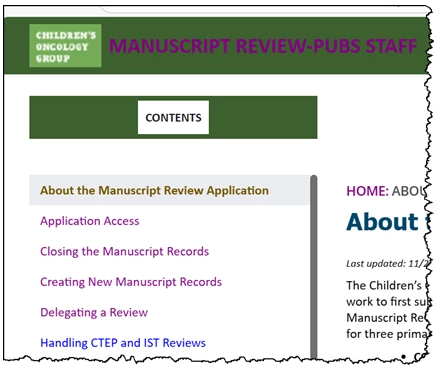
In RH2022, fonts in header are purple; should be white. Fonts in ToC are blue, then purple when selected; should be tan (#705505)

  • April 1, 2026
  • 2 replies
  • 52 views

I’ve gone into great detail to ensure that all fonts everywhere are coded for the correct color. Never had a situation like this before. No matter what I do, fonts are goofball. Like this:
 

    2 replies

    Peter Grainge
    Community Expert
    Community Expert
    April 2, 2026

    Start by going to the template and looking in the TOC section. You have not said which template you are using (it’s default name, not any customised name you have applied).

    I’m guessing the purple toc items have been clicked and the blue one has not. The fact the title is also mauve suggests some change you have made is overriding other styles.

    I recall telling you way back to back up your template before making changes. Go back to an earlier template.


    My site www.grainge.org includes many free Authoring and RoboHelp resources that may be of help.


    Use the menu (bottom right) to mark the Best Answer or Highlight particularly useful replies. Found the answer elsewhere? Share it here.
    Inspiring
    April 1, 2026

    ...in fact, I’ve tried several colors, but all I get is that curious purple...