
Participant
August 4, 2015
Question

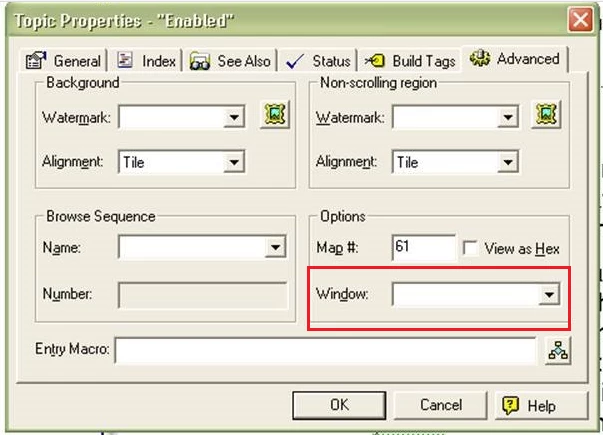
In robohelp 11, is there a way to assign a window specifically to a topic page?

  • August 4, 2015
  • 1 reply
  • 309 views

In robohelp 11, is there a way to assign a window specifically to a topic page like there is in Robohelp 7? When in robohelp7, if you go to Topic properties for a Topic, and in the general tab you will see a "Window" field with a drop down... We are wondering if robohelp 11 also has this?
    This topic has been closed for replies.

    1 reply

    Community Expert
    August 6, 2015

    Are you by chance using Robohelp for Word, rather than Robohelp HTML?

    zbellxAuthor
    Participant
    August 11, 2015

    No we are using Robohelp 11, with our project's being generated as Microsoft HTML help (.chm) files.

    Community Expert
    August 12, 2015

    Sorry, I assumed you were evaluating RH11 and hadn't yet moved to it. Were you using Robohelp for Word previously? I don't ever remember seeing the setting before and I've used RH HTML on and off since X3. However I've never used RH Word. I searched, and the only reference I could find was in a Robohelp for Word (v7) topic. It's about reports rather than the setting itself, but says that the setting is only for WinHelp 4.

    Topic Properties Report

    Maybe what you need is in the table of contents properties. Open the TOC, right-click on a book or page and select Properties. Then on the Advanced tab there are Window and Frame options.

    HTH