January 18, 2011
Answered

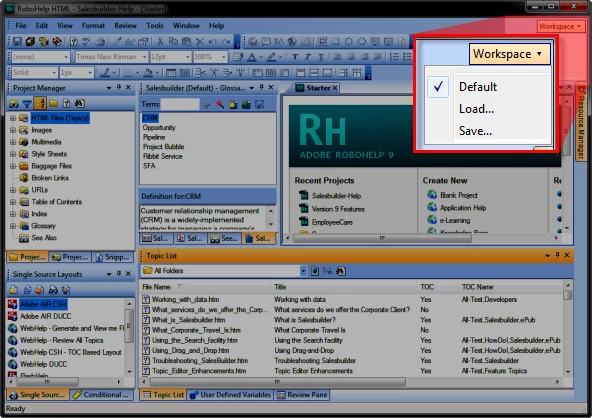
In Robohelp 9, how do you restore the default layout of the GUI

  • January 18, 2011
  • 1 reply
  • 1286 views

Hi,

In RH 9 I've closed and rearranged some pods / windows (not sure of the correct terminology yet). I would ideally like to get them back to their default position. Can anyone please tell me how to do this?

Thanks,


Gail

    This topic has been closed for replies.
    Correct answer Captiv8r

    Hi there

    Unfortunately it's no longer on a menu.

    Take a peek at the image below and it should come clear.

    Cheers... Rick

    Helpful and Handy Links

    RoboHelp Wish Form/Bug Reporting Form

    Begin learning RoboHelp HTML 7, 8 or 9 within the day!

    Adobe Certified RoboHelp HTML Training

    SorcerStone Blog

    RoboHelp eBooks

    1 reply

    Jeff_Coatsworth
    Community Expert
    Community Expert
    January 18, 2011

    Not sure about RH9 (haven't had a chance to load mine yet), but in RH8 it's File > Environment > Load Default Environment

    Captiv8r
    Captiv8rCorrect answer
    Legend
    January 18, 2011

    Hi there

    Unfortunately it's no longer on a menu.

    Take a peek at the image below and it should come clear.

    Cheers... Rick

    Helpful and Handy Links

    RoboHelp Wish Form/Bug Reporting Form

    Begin learning RoboHelp HTML 7, 8 or 9 within the day!

    Adobe Certified RoboHelp HTML Training

    SorcerStone Blog

    RoboHelp eBooks

    Jeff_Coatsworth
    Community Expert
    Community Expert
    January 18, 2011

    Ahh, it's like FM9 now ;>)