
Participant
July 2, 2020
Question

In Upgrade f/ 2019 Classic to 2019, variables are erroneously repeated

  • July 2, 2020
  • 3 replies
  • 170 views

I have just upgraded a project first from Robo 2017 to Robo 2019 Classic (that went fine), then from Robo 2019 Classic to Robo 2019.


In the resulting pages, my user-defined variables are being repeated in my project (authoring) files.
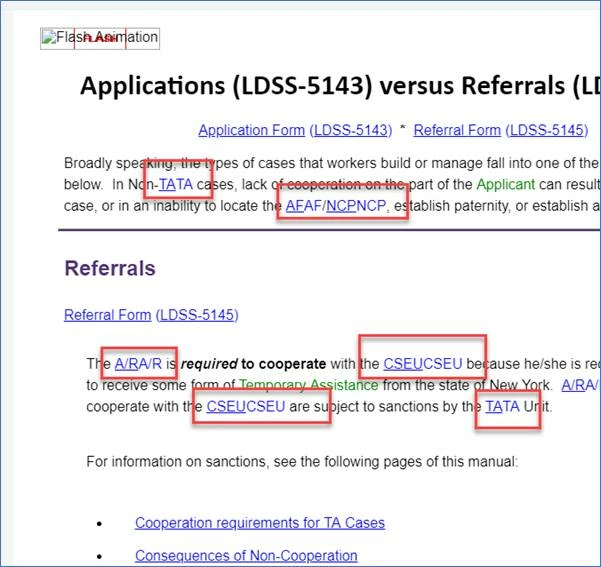
And in the output files, they are appearing in triplets.
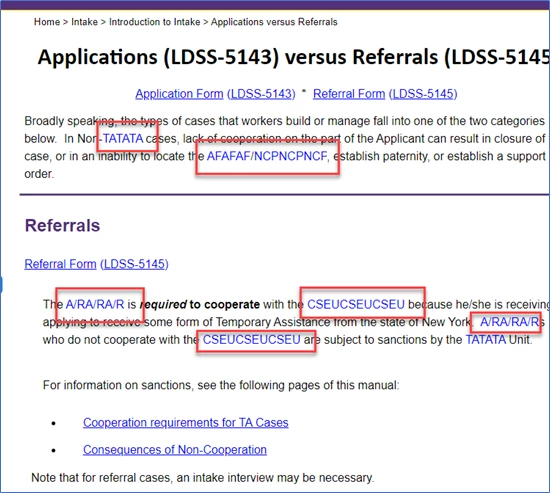


Does anyone know why this is, or how to fix it?


Thanks, 


Mark


    This topic has been closed for replies.

    3 replies

    Community Expert
    July 3, 2020

    One problem with duplicate variables was fixed in Update 13 - RH-6921.


    Make sure you're on Update 14 - there was another big problem in 13 you want to avoid - and see if it works properly. I'm unsure if would be fixed automatically or if you need to try upgrading your project again.

    Peter Grainge
    Community Expert
    Community Expert
    July 2, 2020

    Also did it break between 2017 and 2019 Classic or between 2019 Classic and 2019 New UI?


    Use the menu (bottom right) to mark the Best Answer or Highlight particularly useful replies. Found the answer elsewhere? Share it here.
    Jeff_Coatsworth
    Community Expert
    Community Expert
    July 2, 2020

    What version of RH are you running? Did you apply all the patches before upgrading the project?