
August 19, 2013
Question

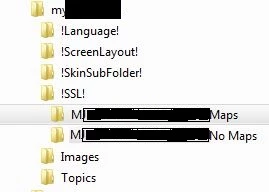
In Windows Explorer, in the !SSL! folder, what file do I double-click to start the Help project?

  • August 19, 2013
  • 2 replies
  • 776 views

I am working on a project with two TOC files and conditional build tags for Help topics specific to each TOC.  When I modify the WebHelp single source to make one of the TOC files the default for the compile / build, I specify a different sub-folder in the !SSL! folder to catch the "build" but then how can I start each build directly from the folder?  The button in the RoboHelp interface starts the same one, no matter which build I've just done.

Is the "magic button" a .js file, .xml file, .htm file, or ???
Thank you.

This topic has been closed for replies.

2 replies

Anjaneai_Srivastava
Adobe Employee
Adobe Employee
August 20, 2013

Or you can browse to that location and if this is a Webhelp/Flash Project look for the index.htm file and you can launch it to view your help file. Incase this is a WebHelp pro/Flash Help pro (for RH Server) check for the HTM file by the name of your default topic like-- First_Topic.htm

Peter Grainge
Community Expert
Community Expert
August 20, 2013

You start the one you want from the Single Source Layout pod where you created the layouts. Double click the one you want and one of the options will be Save and Generate.


See www.grainge.org for RoboHelp and Authoring tips

@petergrainge

Use the menu (bottom right) to mark the Best Answer or Highlight particularly useful replies. Found the answer elsewhere? Share it here.
August 20, 2013

Thank you, Peter, but I don't want to go through the "generate" process every time I want to look at one of the Help projects. I am hoping that there's one file that I can click on (or specify in a shortcut) that will start the Help engine and load the specific project.  If I'm risking something going astray, let me know.

Captiv8r
Legend
August 20, 2013

Hi Rob

I think Peter was suggesting you actually spend a moment and examine the dialog you see when you double-click the layout. The file you want is actually specified in one of the screens of the resulting dialog.

Cheers... Rick