


Participant
February 22, 2023
Question

Incorrect Charset used when compiling Chinese

  • February 22, 2023
  • 2 replies
  • 532 views

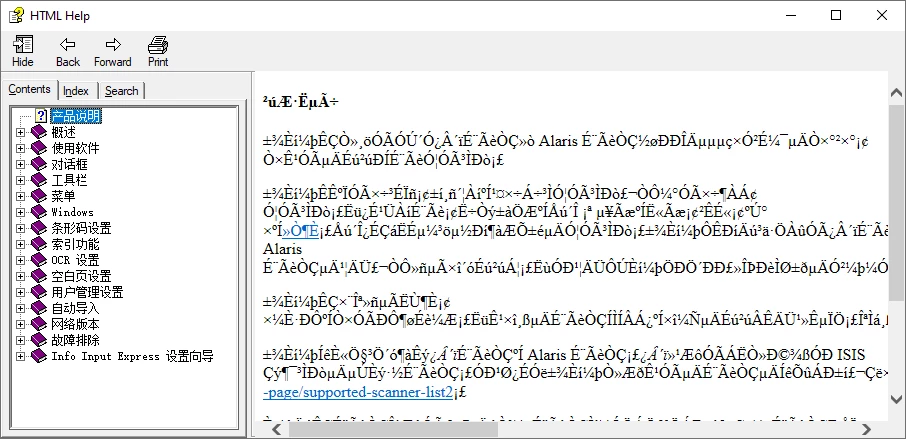
I use RoboHelp 2020.8.34. When I tried to compile a project to CHM, the content shows garbaged in non-Chinese sytem. See below image for reference.
If we right click in the page and select View Source, we can see the charset is set CP936.
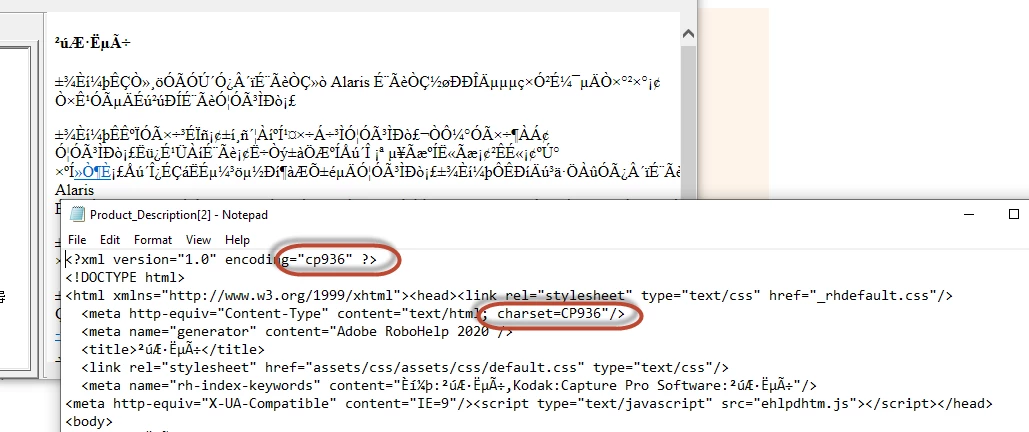
 

If we decompile the CHM and change CP936 to GB2312, and re-compile it with HTML Help Workshop. The CHM can display in both Chinese and non-Chinese system.


The same issues happens for Korean, and Tradition Chinese(Taiwan) and also in RoboHelp 2020 other versions.


Will there be any fix on this?


    This topic has been closed for replies.

    2 replies

    Community Expert
    February 23, 2023

    Hmm, I don't think I can help then. (I think I see the problem - there's only one simplified chinese option in the Language field, unlike in the Encoding field in the Frameless output.)


    I think you'll need to contact Adobe support. The email address on the following page is recommended as it goes to a dedicated Robohelp team: https://helpx.adobe.com/contact/enterprise-support.other.html#robohelp

    Participant
    February 23, 2023

    Thank you.

    Community Expert
    February 22, 2023

    This may be a limitation with the chm compiler, which is a Microsoft tool which has not been updated since about 2006.


    However, there are a few places in Robohelp that relate to language, which you could try changing to see if they help:

    1. File > Project Settings > General section, Language field. Try changing this to English before generating the English chm.

    2. In the Output Preset for the English output, the Encoding field. You could try selecting one of the UTF-8 options. I don't know what the difference is but it's easy to change to see what effect it has.

    (There's also a language field in the Topic Properties but I would not recommend changing this every time you generate a different output.)


    If these settings don't help, then I think you are running into the limitation I mentioned before. I believe that for double-byte languages the Windows system and locale settings must both match the language you want to generate. If this is the case, you may need to change the system and locale settings to English to successfully generate the English chm


    See the information under CHMs #9 Searching in Asian Pacific (double-byte) languages / Garbage in TOC and Index.

    https://www.grainge.org/pages/snippets/snippets.htm#chms


    This page also includes information about this (and instructions from when people actually used HTML Help Workshop to maintain their help 🙂 )

    http://kb.helpwaregroup.com/ms-html-help/hh-tips-tricks/jp

    Participant
    February 22, 2023

    Thank you Amebr for your quick reply. Unfortunatelly it doesn't help for my situation.

    I don't think this related to CHM compilor (though it's a very old one).

    The issue is caused by the chaset in meta information in HTML files,  which are generated by RoboHelp from the content HTML (XML content in UTF-8). The informat in meta information should be charset insetad of code page.

    E.g. for English, it uses charset Windows-1252

    For Simplified Chinese, it should be GB2312 instead of CP936.


    If RoboHelp changed the charset, the compiler can careate the correct CHM file.

    Jeff_Coatsworth
    Community Expert
    Community Expert
    February 22, 2023

    If you create other forms of output (like Responsive HTML5) does the font carry through to the generated output? If so, then the issue has to be in some quirk of CHM generation (like your Windows language and your RH langue must match, or something like that - CHMs are ancient technology). If not, then I suspect the issue is the font choices you're using.
    [edit - did this ever work for you before?]