Participant
April 17, 2019
Question

Incorrect formatting in search [Edge]

  • April 17, 2019
  • 2 replies
  • 657 views

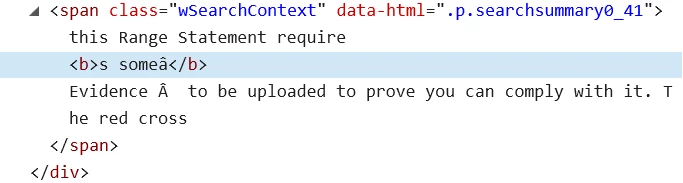
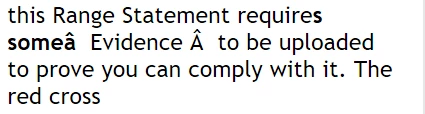
I've been developing a project in the newest release of Robohelp (2019) and have come across an issue when checking over the site in Edge. When I use the search function it seems to be occasionally inserting the 'Â' character, bolding the wrong words or only half the word and also breaking words with spaces.

The search seems to display fine in IE11 and Chrome, anyone have any ideas why this is happening with Edge and how to fix it?

(search term used for the image below: "Evidence")
    This topic has been closed for replies.

    2 replies

    Prahul
    Adobe Employee
    Adobe Employee
    April 24, 2019

    The bug regarding breaking of suggestive words with spaces is fixed in update 7.The update will be available in the next few days.

    Peter Grainge
    Community Expert
    Community Expert
    April 17, 2019

    Could you post here the source view of the text that gives that problem so that I can try it?


    See www.grainge.org for free RoboHelp and Authoring information.

    @petergrainge

    Use the menu (bottom right) to mark the Best Answer or Highlight particularly useful replies. Found the answer elsewhere? Share it here.