
Participant
March 23, 2017
Answered

Incorrect Title in CHM Title Bar

  • March 23, 2017
  • 1 reply
  • 908 views

How can I get the new project name to display in the title bar of the help file?

  • I have a project that has been renamed under File | Rename Project.
  • I have gone into Project | Project Settings | General and changed the Project Title there.
  • I have renamed the TOC and Index files to the new name.
  • When I generate the Microsoft HTML Help (Primary Output) the help screen has the old project name in the title bar.
  • I created a new output file and the results were the same...old project name appeared in the title bar of the Help window.

What am I missing?
This topic has been closed for replies.
Correct answer Captiv8r

Hi there

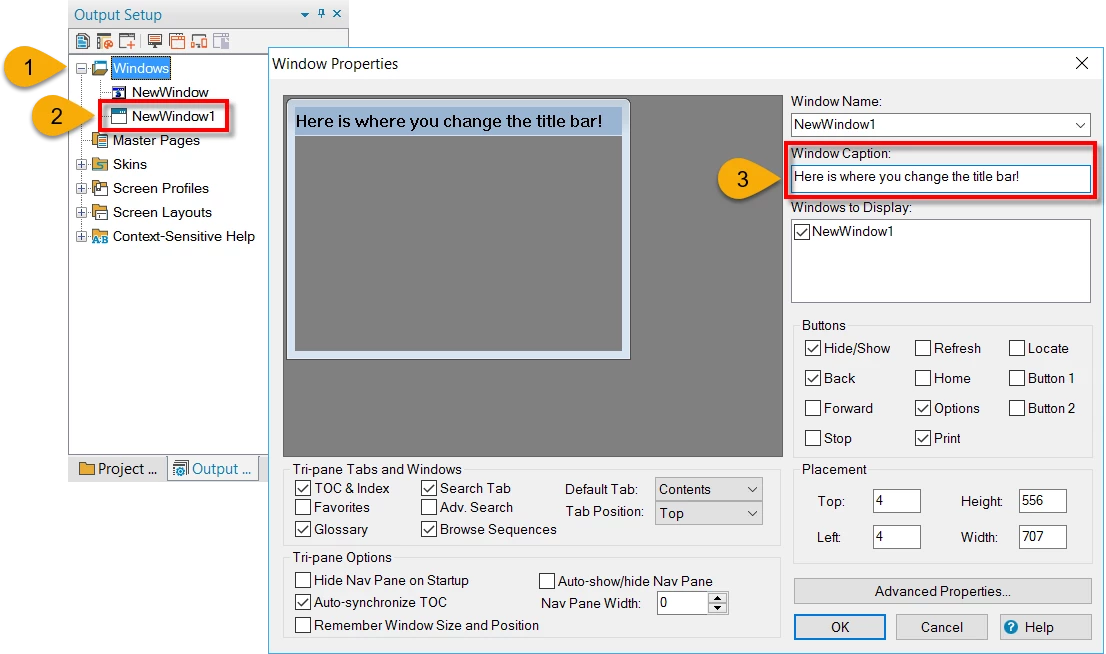
For CHM output, you change the Window properties.

You didn't say what version of RoboHelp you are using, but if it's older than 2015, the pod is named Project Setup I think. So open that pod. If it's 2015 Release or 2017 Release, the pod is named Output Setup. So open that pod, expand the Windows folder, then double-click the CHM window type you should see there.

Then change the Window Caption field.

Cheers... Rick

1 reply

Captiv8r
Captiv8rCorrect answer
Legend
March 23, 2017

Hi there

For CHM output, you change the Window properties.

You didn't say what version of RoboHelp you are using, but if it's older than 2015, the pod is named Project Setup I think. So open that pod. If it's 2015 Release or 2017 Release, the pod is named Output Setup. So open that pod, expand the Windows folder, then double-click the CHM window type you should see there.

Then change the Window Caption field.

Cheers... Rick