
Indent set in bullet paragraph styles don't match the indent shown in the Paragraph formatting
I'm using RH 2017 and have an issue with the left indents for bullet styles.
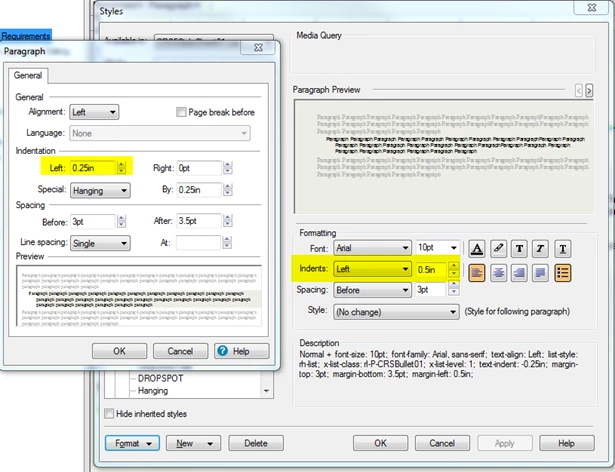
To get the left indent of my bullet styles where I want them, I have to set the Indents Left setting in the Styles dialog box to double the amount I want.
For example, for a bullet style to indent 0.25 inches, I have to set the left indent for the style to 0.5in. If I then click the Format button on the Styles dialog box and select Paragraph, the paragraph formatting dialog box shows the indent for the bullet paragraph to be 0.25in (see image). When I apply the bullet style to a paragraph, it uses the 0.25in indent shown in the paragraph formatting, not the 0.5inches that is set for the indent in the style's properties.
Can anyone tell me why I'm getting this discrepancy?
Thanks


 AdChoices