
Known Participant
August 30, 2020
Question

Indentation issue in Numbered List with an icon/image (RH 2019.0.12)

  • August 30, 2020
  • 8 replies
  • 784 views

Hi,

My work includes adding UI icons while writing steps to do something.

Upon doing the same, the indentation of the numbered list with the number got mismatched.

Please refer the attached image for depicting actual issue and suggest me if anything can be done.
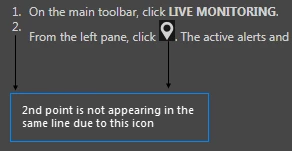
Thanks!

    This topic has been closed for replies.

    8 replies

    Community Expert
    September 9, 2020

    I'm glad it's working for you now. 


    I tried replicating with the code snippet you posted, but couldn't. I'm going to put this one down to the phase of the moon. 🙂

    Community Expert
    September 3, 2020

    I nearly said you should try closing RH and reopening to see if the display fixed itself. There is a bug with images not refreshing correctly in RH2019 (I forget if it's been fixed in patch 13 or 14 or not until RH2020) and I wondered if the same solution would work for other issues.


    To confirm the initial problem, all you did was remove 'position: absolute;' from the ol an ul styles?

    s_wengAuthor
    Known Participant
    September 4, 2020

    Yes, for the initial problem.

    And actually with the restart of RH, the later issue occurred. Will check and let you know if I get any luck to fix this as well.

    s_wengAuthor
    Known Participant
    September 8, 2020

    Hi @Amber,

    It seems the problem was temporary, as it has gone automatically without doing anything.

    There may be some bug or something in the List style too.

    Community Expert
    September 3, 2020

    Hmm it sounds strange as I would expect the display in Robohelp to be correct.

    I wouldn't mind poking around a bit further in case other people have the problem. Would you mind posting the style that was causing problems?

    s_wengAuthor
    Known Participant
    September 3, 2020

    Sure, here is the list style that was creating issue...both ordered and unordered.


    ol {
      margin-top: 0px;
      margin-bottom: 0px;
      list-style: none;
      --prefix-size: 40px;
      --prefix-fixed-size: false;
      --prefix-gap: 8px;
      --list-indent: 28px;
      --vertical-spacing: 4px;
      counter-reset: item1;
      padding-left: var(--prefix-size);
      margin-left: calc(var(--list-indent) - var(--prefix-size));
    }
    ul {
      margin-top: 0px;
      margin-bottom: 0px;
      --prefix-size: 40px;
      --prefix-fixed-size: false;
      --prefix-gap: 8px;
      --list-indent: 28px;
      --vertical-spacing: 4px;
      counter-reset: item1;
      list-style: none;
      padding-left: var(--prefix-size);
      margin-left: calc(var(--list-indent) - var(--prefix-size));
    }
    ol>li {
      --prefix-size: 40px;
      --prefix-fixed-size: false;
      --prefix-gap: 8px;
      --list-indent: 28px;
      --vertical-spacing: 4px;
      position: relative;
      margin-top: calc(var(--vertical-spacing) / 2);
      margin-bottom: calc(var(--vertical-spacing) / 2);
      font-family: 'Segoe UI';
      font-size: 9pt;
      color: #D1D1D1;
      line-height: 1.5;
    }
    ol>li:before {
      counter-increment: item1;
      content: counter(item1, decimal)".";
      text-align: right;
      position: absolute;
      left: calc(-1 * var(--prefix-size) - var(--prefix-gap));
      margin-right: var(--prefix-gap);
      width: var(--prefix-size);
      overflow: hidden;
      font-family: 'Segoe UI';
      font-size: 9pt;
      color: #D1D1D1;
      line-height: 1.5;
    }
    ul>li {
      --prefix-size: 40px;
      --prefix-fixed-size: false;
      --prefix-gap: 8px;
      --list-indent: 28px;
      --vertical-spacing: 4px;
      position: relative;
      margin-top: calc(var(--vertical-spacing) / 2);
      margin-bottom: calc(var(--vertical-spacing) / 2);
      line-height: 1.5;
    }
    ul>li:before {
      counter-increment: item1;
      content: counter(item1, disc);
      text-align: right;
      position: absolute;
      left: calc(-1 * var(--prefix-size) - var(--prefix-gap));
      margin-right: var(--prefix-gap);
      width: var(--prefix-size);
      overflow: hidden;
      font-family: 'Segoe UI';
      font-size: 10pt;
      line-height: 1.5;
    }
    ul>li>ul {
      --prefix-size: 40px;
      --prefix-fixed-size: true;
      --prefix-gap: 12px;
      --list-indent: 20px;
      --vertical-spacing: 4px;
      counter-reset: item2;
      list-style: none;
      padding-left: var(--prefix-size);
      margin-left: calc(var(--list-indent) - var(--prefix-size));
    }
    ul>li>ul>li {
      --prefix-size: 40px;
      --prefix-fixed-size: true;
      --prefix-gap: 12px;
      --list-indent: 20px;
      --vertical-spacing: 4px;
      position: relative;
      margin-top: calc(var(--vertical-spacing) / 2);
      margin-bottom: calc(var(--vertical-spacing) / 2);
      line-height: 1.5;
    }
    ul>li>ul>li:before {
      counter-increment: item2;
      content: counter(item2, disc);
      text-align: right;
      position: absolute;
      left: calc(-1 * var(--prefix-size) - var(--prefix-gap));
      margin-right: var(--prefix-gap);
      width: var(--prefix-size);
      overflow: hidden;
      line-height: 1.5;
    }
    ol>li>ol {
      list-style: none;
      --prefix-size: 40px;
      --prefix-fixed-size: false;
      --prefix-gap: 8px;
      --list-indent: 40px;
      --vertical-spacing: 8px;
      counter-reset: item2;
      padding-left: var(--prefix-size);
      margin-left: calc(var(--list-indent) - var(--prefix-size));
    }
    ol>li>ol>li:before {
      counter-increment: item2;
      content: counter(item2, lower-roman)".";
      text-align: right;
      position: absolute;
      left: calc(-1 * var(--prefix-size) - var(--prefix-gap));
      margin-right: var(--prefix-gap);
      width: var(--prefix-size);
      overflow: hidden;
      margin-left: ;
      line-height: 1.5;
    }
    ol>li>ol>li {
      --prefix-size: 40px;
      --prefix-fixed-size: false;
      --prefix-gap: 8px;
      --list-indent: 40px;
      --vertical-spacing: 8px;
      position: relative;
      margin-top: calc(var(--vertical-spacing) / 2);
      margin-bottom: calc(var(--vertical-spacing) / 2);
      line-height: 1.5;
    }


    From the above code,  I just removed Position: Absolute.

    Community Expert
    September 2, 2020

    So the style was not in your stylesheet, only in your output?


    Can you post where you found the style, and what the name and settings were? If I have the details I might be able to find where the style comes from, so you can fix it properly, rather than fixing it every time you generate your help.

    s_wengAuthor
    Known Participant
    September 2, 2020

    No No...It's not in the output folder. I made the changes in the stylesheet only. I have removed this from the source code of the css:

    Postion: Absolute

    and after this when I generated the output it was working fine...

    "However, the source has still no change.", with this line I meant even after changing the css source code...the indentation is not correctly displayed in the RH editor but the changes are reflected in the output.


    Please let me know if you still need any code.

    Community Expert
    September 1, 2020

    I think it will be something with how your css is defined, but I don't know what. I tried to recreate in a test project but can't.


    The best I can think is that you create a new temporary project and gradually copy in your styles until you discover the change that makes your numbering misalign.

    s_wengAuthor
    Known Participant
    September 1, 2020

    Thanks @Amber, will try and let you know if got success.

    s_wengAuthor
    Known Participant
    September 2, 2020

    So, finally, it is solved, though in the output only.
    I don't know how but in CSS, the position of the lists was set to Absolute...I just removed it and now the output is displaying fine, as required.

    However, the source has still no change.


    Thanks!

    Jeff_Coatsworth
    Community Expert
    Community Expert
    August 31, 2020

    You know you're only dealing with a user-to-user forum here, right?
    Try updating and see if that makes any difference.

    s_wengAuthor
    Known Participant
    August 31, 2020

    A quick resolution to this would be highly appreciable as I need to fix it before the release, which is in just a week.


    Thanks!

    Community Expert
    August 31, 2020

    Does it only display like that when editing in Robohelp, or also after you generate and view the output?

    s_wengAuthor
    Known Participant
    August 31, 2020

    Hi,


    It is same as illustrated, at both the places... while editing as well as in the output also.
    Actually, other steps are fine...it happens only in the case where I add some icon in the step.