bronxguys02
Known Participant
May 1, 2025
Answered

Index and Glossary Frameless Skin RH2020

  • May 1, 2025
  • 3 replies
  • 1165 views

RH 2020.8.34


I'm customizing the Studio Frameless skin. I worked with the Left Panel options and thought I added Index and Glossary in the tab section. As seen in the attached images, the Index and Glossary buttons do not display after generating. Hopefully it's an easy fix I overlooked.


Thanks!

Correct answer Peter Grainge

I get the same results with Studio2. I only have the First Topic topic in my project so far (default.htm) - no other topics yet. I used the Index and Glossary as shown in your image to set them up.


... but have you set up any Index entries or glossary terms. Selection those items only includes them if you have set up an index and/or glossary. If you select them in the preset but haven't set them up, then RoboHelp has the sense not to include the tab.


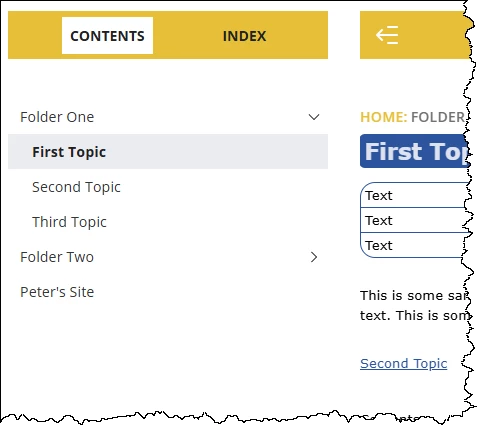
Here I have selected both options but as I haven't set up any glossary terms, RoboHelp is not including the tab.
 

________________________________________________________

My site www.grainge.org includes many free Authoring and RoboHelp resources that may be of help.


3 replies

Peter Grainge
Community Expert
Community Expert
May 2, 2025

Please use the photo icon to insert images within the post. Seeing an image inline with the text makes it easier for anyone answering or viewing the post.


I'm still not clear on what you are doing. This is the Left Panel.


Specifically which setting are you changing?

________________________________________________________

My site www.grainge.org includes many free Authoring and RoboHelp resources that may be of help.


Use menu (bottom right) to mark as Best Answer or to Highlight particularly useful replies. Found the answer elsewhere? Share it here.

bronxguys02
Known Participant
May 2, 2025

I'm changing the selected-tab setting at the bottom. I selected each tab individually in the layout and updated the Content field so I would have Contents, Index, and Glossary tabs. 

Peter Grainge
Community Expert
Community Expert
May 2, 2025

I'm not sure what that Content field does but you don't need it to get the three tabs. You simply select those options in the preset. 


Create a second Studio skin (call it Studio 2 to leave your existing template) and do not make any modifications. Then select as below in the preset. 


Without any template changes but with those selections, you will get all three tabs.


I entered text in that Content field but it doesn't come through anywhere. Logically that should mean it makes no difference to your output so I think you must have done something else. Were your glossary and index set up here rather than in some topic?


________________________________________________________

My site www.grainge.org includes many free Authoring and RoboHelp resources that may be of help.


Use menu (bottom right) to mark as Best Answer or to Highlight particularly useful replies. Found the answer elsewhere? Share it here.

Peter Grainge
Community Expert
Community Expert
May 2, 2025

You don't so much add the index and glossary as customise them. What exactly did you do in those sections?


Do you have Index and Glossary set up in the preset?

________________________________________________________

My site www.grainge.org includes many free Authoring and RoboHelp resources that may be of help.


Use menu (bottom right) to mark as Best Answer or to Highlight particularly useful replies. Found the answer elsewhere? Share it here.

bronxguys02
Known Participant
May 2, 2025

I selected each tab individually (Contents, Index, Glossary) in the Topic Page > Left Panel > selected-tab and changed the Contents field to the name I want (Contents, Index, Glossary). I selected Include Index and I have a glossary term in the  Default Glossary.

Jeff_Coatsworth
Community Expert
Community Expert
May 1, 2025

Try undoing what you did to see if that fixes it - then start adding one thing at a time (generating each time) to see what makes it change.

