


Inspiring
June 21, 2023
Answered

index.htm not being generated - Responsive HTML5 output

  • June 21, 2023
  • 4 replies
  • 459 views

I'm using RoboHelp 2019.0.14.

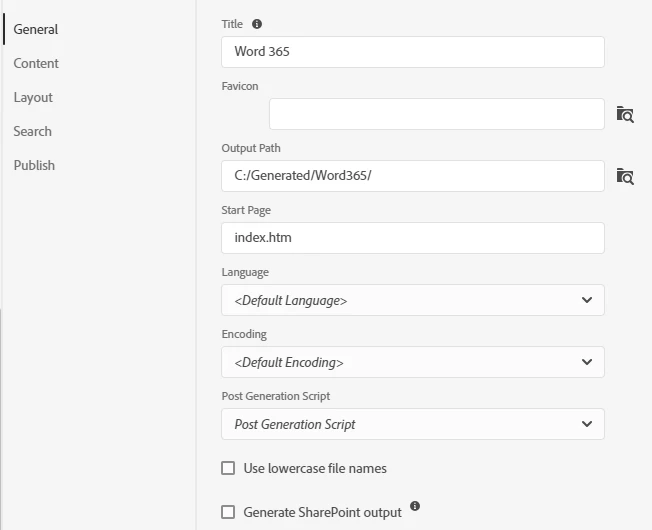
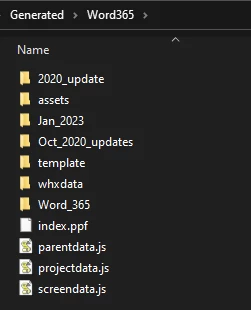
When I generate a project using a Responsive HTML5 preset, the index.htm file is not being created and I wondered whether anyone might be able to suggest why is happening.
Thanks in advance for any suggestions!

This topic has been closed for replies.
Correct answer Jo_Pearson

Thanks very much for taking the time to offer this suggestion. 


I have just this minute found out that the files I need to work on are not RH2019, and unbeknownst to me, they have in fact been opened and saved in RH2020, so I've installed that and now when I generate an output, the index.htm is being created.


I really appreciate everyone's suggestions and I shall keep all the information shared for future reference.


Onwards and upwards!

4 replies

Peter Grainge
Community Expert
Community Expert
June 22, 2023

As long as you had admin rights, that should be enough. You shouldn't need to use Run as Admin


Locate the presets folder in your project and copy all the files to somewhere safe. Then try creating a new preset.


You could also try deleting the .rh folder in a copy of your project. The files contain cached information about the project files. (*.db.json) and the recently opened file list (*.preference.json). The information will be recreated when the project is opened again. If the project is connected to version control then the rh folder also stores the version control connection information (vc_info.json). Deleting this file will remove the connection from inside RoboHelp.


Let us know if that helps.

________________________________________________________

My site www.grainge.org includes many free Authoring and RoboHelp resources that may be of help.


Use menu (bottom right) to mark as Best Answer or to Highlight particularly useful replies. Found the answer elsewhere? Share it here.
Jo_PearsonAuthorCorrect answer
Inspiring
June 22, 2023

Thanks very much for taking the time to offer this suggestion. 


I have just this minute found out that the files I need to work on are not RH2019, and unbeknownst to me, they have in fact been opened and saved in RH2020, so I've installed that and now when I generate an output, the index.htm is being created.


I really appreciate everyone's suggestions and I shall keep all the information shared for future reference.


Onwards and upwards!

Community Expert
June 22, 2023

You could try getting a fresh copy of the samples from the installation directory, just in case something got corrupted.


You should find them somewhere similar to C:\Program Files\Adobe\Adobe RoboHelp 2019\resources\data\template\projects


Don't try to open them from this location, as Microsoft has security features on the Program Files folder which will prevent them from working correctly. 

Inspiring
June 22, 2023

Thanks for that suggestion. I copied from the sample from Program Files and when I generated one of the samples, I got an index.htm, so it would appear that it's possible the other files I'm working on may be corrupted.

Peter Grainge
Community Expert
Community Expert
June 21, 2023

Is your project installed to the default path and was it installed with admin rights?

________________________________________________________

My site www.grainge.org includes many free Authoring and RoboHelp resources that may be of help.


Use menu (bottom right) to mark as Best Answer or to Highlight particularly useful replies. Found the answer elsewhere? Share it here.
Inspiring
June 22, 2023

Thanks for your reply.

RoboHelp is installed to the default path and I have administrator rights on my user account, but I just ran the setup.exe to install RoboHelp, I didn't choose Run as Administrator - I can try that.

Jeff_Coatsworth
Community Expert
Community Expert
June 21, 2023

Is the sample project working?

Inspiring
June 21, 2023

Thanks for replying.


I've tried opening both of the sample projects from here: My RoboHelp Projects\Adobe RoboHelp 2019\Samples and when I try to add a new Output Preset, I get the following message. I've restarted RoboHelp (and my PC) but I keep getting the same message.


Jeff_Coatsworth
Community Expert
Community Expert
June 21, 2023

Hmm, that kind of indicates something is going wrong with the install of RH2019; you might try uninstalling/reinstalling, or provided you're on the subscription model, move up to RH2022 Patch 2.