

Index key words no longer merge
Hi all,
I hope, one of you can help. I'm working with RH 2015 and Windows 7. I'm creating merged projects in responsive HTML5 with the two default layouts "azur_blue" and "charcoal_grey"
With my previous merged project, index key words that were the same were merged into one key word containing the topics from all child projects. Apparently, this no longer works. Instead, I get the index key word separately for every child projects that contains it. I already checked the spelling of the key words; it's exactly the same. Furthermore, some of the key words are always displayed "open", even though they were not clicked. Those key words do also not close when clicked.
I already made a little test to see if it is a problem of the layout - it is not. It is also not depending on the browser, I tested with Chrome and Firefox.
I add some screenshots to make more clear how it was and how it is now.
This is how it shoud look like: (you can see that the topics are from different projects by the AE, LC2 ...) The index key word is open because I clicked it.
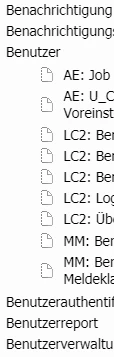
This is how it looks now:
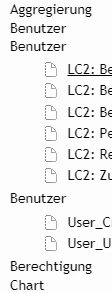
Has anyone experienced a similar behaviour? Any ideas how to fix this? Any help will be appreciated.
Thanks and kind regards
Karin


 AdChoices