
Inspiring
April 11, 2024
Answered

Index Keywords Missing in Webhelp

  • April 11, 2024
  • 2 replies
  • 487 views

Hi! I am trialling RH2022.3.23 for the first time but am experienced with older versions.

I have imported a project from RH9 and am outputting Webhelp.  The problem is that Keywords are missing, apparently at random, from the published Index and new Keywords for existing or new Topics do not apear in the Index.

Screengrab shows RH Author view on left and output Index on right.  
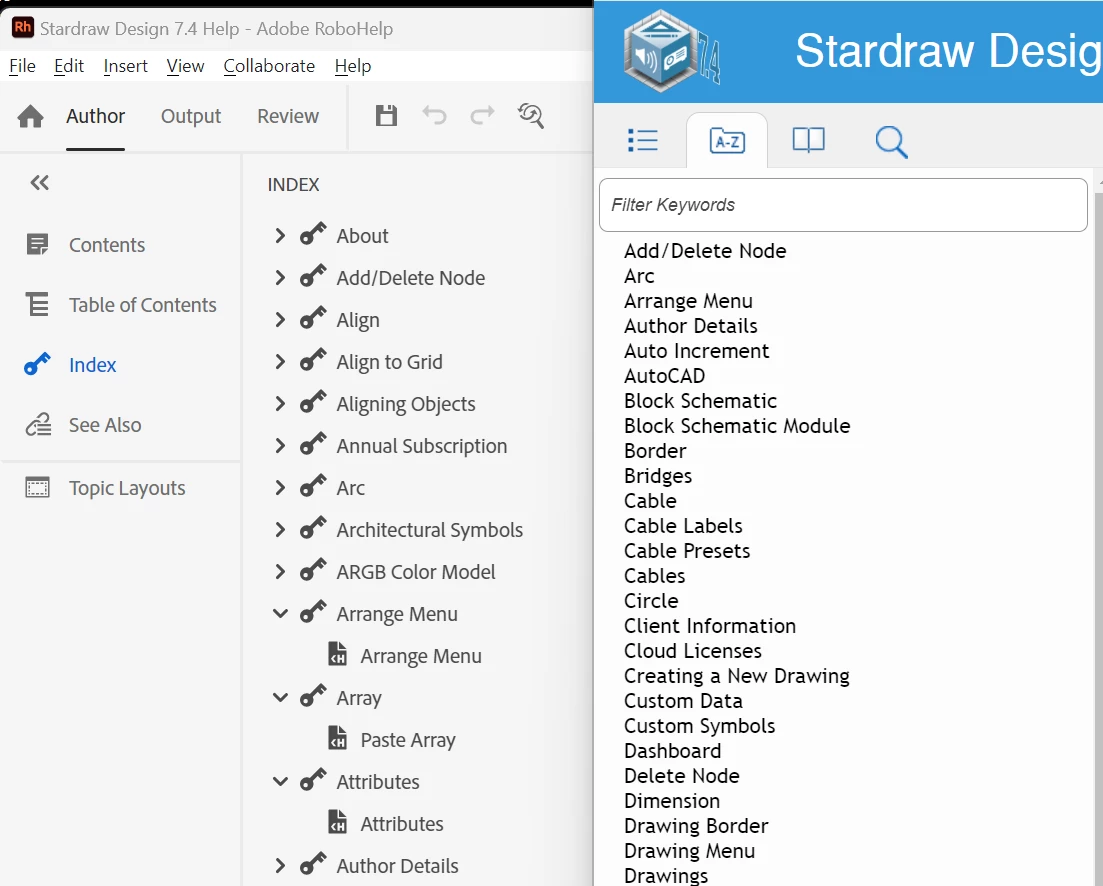
 

Note that of the first 7 Keywords in the Project only 2, "Add/Delete Node" and "Arc", appear in the Webhelp Index.

All Keywords appear in at least 1 Topic.  No Cross References are used. 

I've looked at  ..\My RoboHelp Projects\outputs\...\WebHelp\whxdata\idata1.new.js and can see that the array for the Index is failing to populate all the Keywords.
[index image removed by moderator - kept crashing the webview]


 Can anyone point me in the right direction to fix this?  TIA  

    Correct answer Rob_Rob169

    Just to update those following the thread: I contacted Adobe support (thanks Amebr) and they furnished links for RH2017 and RH2019 installers, suggesting incremental upgrades of the orignal RH9 project via each version.

    That went fine until getting to RH2022 which, in Author view, failed to show the TOC but did show the Index.  However, neither the TOC nor the Index displayed in the generated output.

    Adobe Support's suggestion then was "It appears that the Table of Contents (TOC) may be corrupted, which could be causing the index not to load as well. Could you please try expanding the existing TOC, right-clicking to create a new TOC, and then generating the output? This should display both the TOC and index in the output."

    And it did! Hooray!!

    I'll need to work on the TOC to get back the structure and layout I want, but that's a relatively small price to pay.

    Thanks to all here, and Adobe Support, for their help and suggestions.

    2 replies

    Community Expert
    April 14, 2024

    If Jeff's suggestion doesn't help, consider contacting Adobe support and describe the problem and the forum suggestion to try upgrading through RH2019. They might have a solution, or be able to let you trial the upgrade through RH2019.


    See the following page for support contact options. The email address is recommended as it goes to a dedicate RoboHelp support team.
    https://helpx.adobe.com/contact/enterprise-support.other.html#robohelp

    Inspiring
    April 15, 2024

    Thanks for that link - I've reached out to Adobe support.

    Rob_Rob169AuthorCorrect answer
    Inspiring
    April 24, 2024

    Just to update those following the thread: I contacted Adobe support (thanks Amebr) and they furnished links for RH2017 and RH2019 installers, suggesting incremental upgrades of the orignal RH9 project via each version.

    That went fine until getting to RH2022 which, in Author view, failed to show the TOC but did show the Index.  However, neither the TOC nor the Index displayed in the generated output.

    Adobe Support's suggestion then was "It appears that the Table of Contents (TOC) may be corrupted, which could be causing the index not to load as well. Could you please try expanding the existing TOC, right-clicking to create a new TOC, and then generating the output? This should display both the TOC and index in the output."

    And it did! Hooray!!

    I'll need to work on the TOC to get back the structure and layout I want, but that's a relatively small price to pay.

    Thanks to all here, and Adobe Support, for their help and suggestions.

    Jeff_Coatsworth
    Community Expert
    Community Expert
    April 11, 2024

    I fixed your version too - there's no Patch 9 of RH2022 (yet in April 2024). Going directly from RH9 to RH2022 should work in theory, but your project may have some issues in it that cause the upgrade to fail in spots. I hope you are still testing the conversion and haven't made edits to the RH2022 project, because I'm going to suggest that you take a copy of the RH9 project (not the original) and upgrade that copy through RH2019 Classic first, verify that the index stuff came through intact, and then upgrade that RH2019 Classic project to RH2022. Your subscription will allow you to download and install RH2019 Classic. 

    Jeff_Coatsworth
    Community Expert
    Community Expert
    April 11, 2024

    PS - there's no such thing as Webhelp anymore - it's now all Responsive HTML5 with the responsiveness turned off in the Preset.