


Inspiring
Oct 16, 2015 9:32 PM UTC
Answered

Index listings not updating when topic names are changed.

I had an existing topic for which keywords had been entered.

Original topic name: "Submitting Purchase Orders to Non-Ricoh Vendors"

New topic name: "Submitting Purchase Orders"

I changed the topic's Title and File Name accordingly...
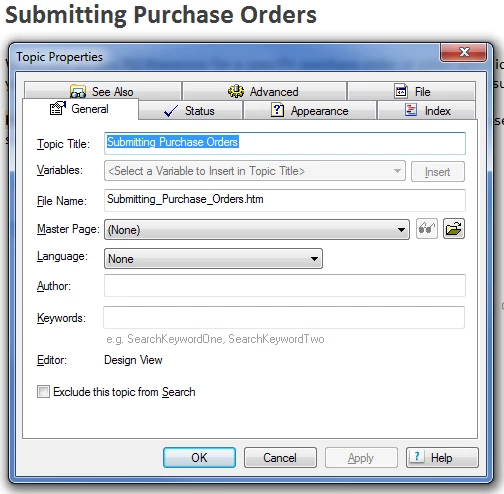
(See "Toshiba" listed below for this topic)
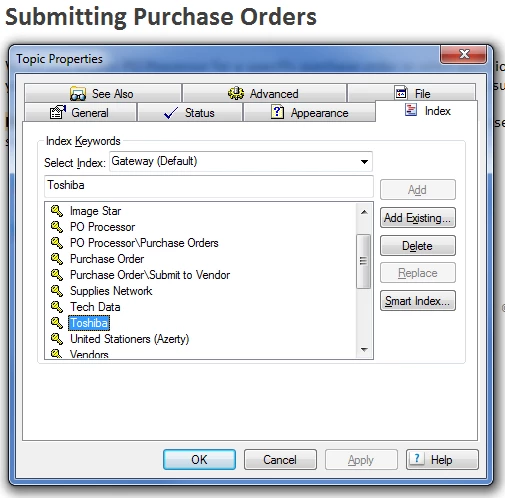
When I generate the project, the Index still shows the old file name...
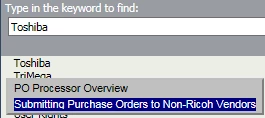
What do I need to do to get the filename to update in the Index?

Thanks!

Tim

This topic is closed to new replies. Start a new post to keep the conversation going.
Captiv8r
Captiv8rCorrect answer
Legend
Oct 16, 2015 9:48 PM UTC

Hi Tim

I'm thinking that you likely need to open the Index editor pod. Locate the keyword linking to this topic, then look in the "Topics For" area at the bottom of the Index pod. You should be able to change the name you see by editing it there.

Cheers... Rick

4 replies

Captiv8r
Captiv8rCorrect answer
Legend
Oct 16, 2015 9:48 PM UTC

Hi Tim

I'm thinking that you likely need to open the Index editor pod. Locate the keyword linking to this topic, then look in the "Topics For" area at the bottom of the Index pod. You should be able to change the name you see by editing it there.

Cheers... Rick

Translate
Inspiring
Oct 16, 2015 10:18 PM UTC

Thanks, Rick!  That worked.

Translate
Community Expert
Oct 19, 2015 6:17 AM UTC

You can see a list of all the places where a topic is referenced by right-clicking on the topic in the Project Manager pod and selecting Show > Topic References. The dialog box shows topics, ToC entries and index entries that reference the topic.

If you click on an index entry (with a key symbol) and click Edit, you can edit the Title field which will update what appears in the index. Similarly you can update ToC entries this way (the book icon). (On the downside, as soon as you click OK, both dialog boxes close and you have to right-click again. Feel free to submit a feature request. )

For topics, Edit will open the applicable topic and you'll have to manually find the reference.

Translate
Inspiring
Oct 16, 2015 9:47 PM UTC

Quick follow-up.  Index report shows correct topic title...

Generated WebHelp output (using RH 10) does not.

Translate