


Known Participant
June 27, 2022
Question

Index Markers from FM leave text an odd color in RH

  • June 27, 2022
  • 1 reply
  • 338 views

I am importing a FM (16.0.3.979) book into RH (2020.7.46), publishing with a custom skin using the Frameless output preset.


Everything is looking pretty good with one exception: in my topic pages, any text tagged with an index marker in FM is a light gray in the final product.
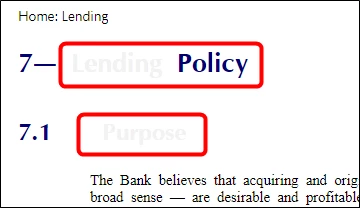


I can't find a setting which controls this behavior so I can fix it.

    This topic has been closed for replies.

    1 reply

    Jeff_Coatsworth
    Community Expert
    Community Expert
    June 27, 2022

    Does the text have a character tag applied to it in FM? The RH Conversion settings allow you to control how that comes over.

    Known Participant
    June 27, 2022

    Not a character tag, but an Index Marker.


    Here is the code for that portion of the topic:


    Both circled words are gray in the final product.


    If I'm looking in the wrong place, Jeff, I apologize for misunderstanding and would appreciate a pointer so I can provide the information you are looking for.

    Jeff_Coatsworth
    Community Expert
    Community Expert
    June 27, 2022

    What's your Conversion Settings screen look like? Your Index Marker should come over as a Character tag (I tell my import to exclude it). Looking at your FM shot there - I think you may have applied the index marker tag to the text itself - you usually only add the marker tag to the spot in the content (at the end or beginning of a word). Here's one of mine: