


Known Participant
May 30, 2022
Answered

Index missing from published output

  • May 30, 2022
  • 3 replies
  • 285 views

Hello 🙂


I'm using RoboHelp 2020.7.46, working with a project consisting of 1 master and 2 child projects. These are set up as prescribed on Peter Grainge's site. I have indexed some of the topics in both child projects, and when I generate and do a test publish to a local directory everything displays correctly:
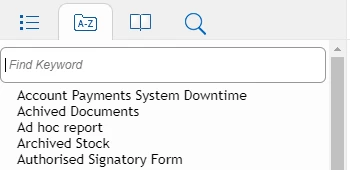
 

When I publish to our server, however, the index disappears.

Between the test local publish and the live server publish, I've made no changes to the output preferences other than the directory to which it should publish. I think there must be something I've done or something in my setup not allowing the index to publish to the live server, as it was always present in previous versions of live. Any suggestions greatly appreciated! 🙂


Thanks,

Mikey

    This topic has been closed for replies.
    Correct answer Amebr

    A file system transfer should be fine (that's how I'm doing it) although I think FTP has better recovery built in, in case of network glitches.


    Does the problem occur with only one browser or different browsers (Chrome, Firefox?)


    You could use a file comparison tool to like Beyond Compare to compare your generated directory with your published directory, to see if something went wrong with the file copy.

    3 replies

    AmebrCommunity ExpertCorrect answer
    Community Expert
    May 30, 2022

    A file system transfer should be fine (that's how I'm doing it) although I think FTP has better recovery built in, in case of network glitches.


    Does the problem occur with only one browser or different browsers (Chrome, Firefox?)


    You could use a file comparison tool to like Beyond Compare to compare your generated directory with your published directory, to see if something went wrong with the file copy.

    Peter Grainge
    Community Expert
    Community Expert
    May 31, 2022

    I agree that file transfer should be fine. I suggested using another method in the hope it got round whatever is the issue. 

    ________________________________________________________
    My site www.grainge.org includes many free Authoring and RoboHelp resources that may be of help.


    Use the menu (bottom right) to mark the Best Answer or Highlight particularly useful replies. Found the answer elsewhere? Share it here.
    Peter Grainge
    Community Expert
    Community Expert
    May 30, 2022

    I'm not sure that having access means you can publish there using the File System. If that is what you have used before, then it should still work unless IT have changed your permissions.


    I think it's worth speaking to them and trying SFTP.

    ________________________________________________________

    My site www.grainge.org includes many free Authoring and RoboHelp resources that may be of help.


    Use the menu (bottom right) to mark the Best Answer or Highlight particularly useful replies. Found the answer elsewhere? Share it here.
    Peter Grainge
    Community Expert
    Community Expert
    May 30, 2022

    My first guess would be how you are publishing. Which option are you using for the live server, File System, SFTP etc.


    I always use SFTP unless publishing to my machine for some reason.

    ________________________________________________________

    My site www.grainge.org includes many free Authoring and RoboHelp resources that may be of help.


    Use the menu (bottom right) to mark the Best Answer or Highlight particularly useful replies. Found the answer elsewhere? Share it here.
    Known Participant
    May 30, 2022

    I'm using File System to publish for both my local test and the live server, as the server is mapped as a network drive on my machine. I've never used any of the other options tbh.