



Index not appearing [properly] in a MS Help file
We have an old, old Robohelp project that has been updated, tidied up and republished in Robohelp 2026. I have updated to the very latest version.
After much struggling I managed to get it to publish with the three tabs: Contents, Index and Search along with the main window with all the web pages.
The contents is right and the search works, but the Index tab is funky. It just says “Index”. If I click the Display button at the bottom up opens up a small windows like this:
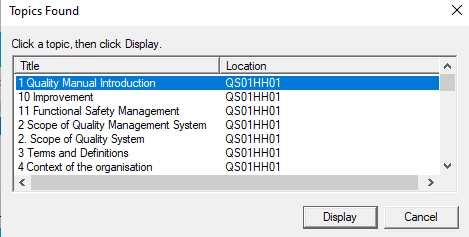
And I can click on any of the entries to open the requisite page. So it’s clearly *kind of* worked out the indexes.
This my first time using Robohelp and it’s been a real struggle to get this far, eventually working out the tortuous way you have to set up the table of contents and how you have to equally tortuously create the index, so I’m likely doing something really stupid!
Is anyone able to suggest what I might be doing wrong? Am happy to give any information that might help, I on’t, at this point, have a clue as to what information to present that would be of assistance.
I read about skins and some index wizard that I thought might help but I cannot find either of those topics anywahere in the program. Are these no longer part of Robohelp?
Many thanks.
 AdChoices