
Participant
October 22, 2025
Question

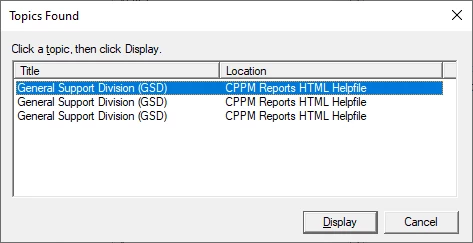
index popup list shows three items with same name

  • October 22, 2025
  • 4 replies
  • 108 views

Hi I'm using Robohelp 2022. I added a keyword to an existing index. Then I
added a one page topic and two topics that were bookmarks inside a different
page. I then generated the .chm file. under Microsoft HTML Help.  Next, I opened the .chm file, went into the
index and double clicked on the keyword. It showed a popup list with three
items. The three items had the same name so I could not tell which topic they go
to unless I duble clicked on the individual items to see what they are.
I went back in author mode and edited the topic
properties under the index keyword and it had no effect on the name that showed
up in the popup list. How can I change the names in the popup list?


Here is the topic popup list in qustion.


    4 replies

    Peter Grainge
    Community Expert
    Community Expert
    October 23, 2025

    I'm not sure and it is donkies years since I worked on a CHM. 


    Can you share the project? If you can, then see the Contact page on my site and send the project as instructed there. Do make sure you include a link to this thread and please do not email the project direct.

    ________________________________________________________

    My site www.grainge.org includes many free Authoring and RoboHelp resources that may be of help.


    Use menu (bottom right) to mark as Best Answer or to Highlight particularly useful replies. Found the answer elsewhere? Share it here.
    Participant
    November 10, 2025

    I could not get the popup list items to be unique.  Going into properties for these in the RH 2022 IDE and changing the name did not help.  As noted above this is a problem with some help file conversions from Robohelp 2019 as in my case.


    Instead, I recast the popup list items as a series of subkeyword under a single keyword.  Each of these is associated with one topic.  Note that it is crucial that the keyword gets it's own topic otherwise the entire entry doesnot show up in the generated .chm file.  Also it is possible to set up a second level of subkeywords under a subkeyword and these will show up in the Microsoft HTML Help .chm file.  Again the first level subkeyword and each of the second level subkeywords *MUST* have a topic associated with it for it to show up in the generated .chm file.  From the end user perspective this is a workable alternative solution.

    Jeff_Coatsworth
    Community Expert
    Community Expert
    November 10, 2025

    CHMs are such antique tech these days that I can't even recall if those sort of popups were unique to the topic name or just to the help file in general.

    Participant
    October 22, 2025

    Also this issue occurs whether I hae just converted the project or I delete and recreate the index key and add the  three topics to it and update the properties for the topick entries on the index.

    Participant
    October 22, 2025

    This is what the index looks like in author mode.  I'm expecting these names to show up on the popup list in the original post.


    Jeff_Coatsworth
    Community Expert
    Community Expert
    October 22, 2025
    Participant
    October 22, 2025

    One thing I forgot to mention is that I just converted this project from Robohelp 2019 and I'm in the process of fixing things up inside the  project.