
jose_cotes
Participant
May 18, 2018
Question

Index sub keywords in Japanese and Chinese not indented, CHM, RH 2015

  • May 18, 2018
  • 1 reply
  • 631 views

Hi all,

Here is how the index of my project looks:
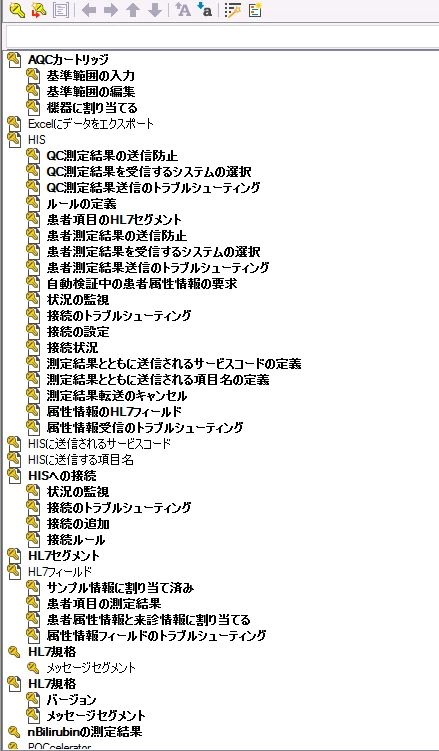
And here is how the HTML Help (CHM) looks like:
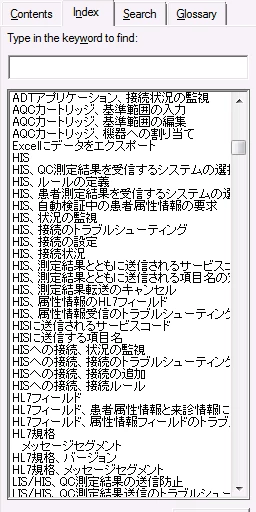
As you can see, the keywords are not indented, instead the tool seems to be adding a comma after the main index, i.e.

HIS

HIS, blah blah blah

HIS, more blah blah blah

Any clue on how to make it look like the output of other languages which is very similar to the Project view?

Thanks,

This topic has been closed for replies.

1 reply

Captiv8r
Legend
May 18, 2018

Hmmm, is Binary index enabled?

Project tab > Project Settings > General tab

If it's already enabled, try disabling and recompiling to see if there is any change.

Cheers... Rick

jose_cotes
Participant
May 18, 2018

Thanks Rick,

I actually found what was going on. Apparently the index is not coming from the HHK, instead is being generated by metadata. In that metadata the linguist were using double byte commas. I have replaced those commas by regular commas and all is working now:

Before:

Right commas:

Hope this is helpful for anybody with the same issue. I used Regular Expressions to do these changes.